Blog
Tik Tok Automation: Mastering Your Ecommerce
Published May 25, 2026
Most TikTok automation advice is backwards. It starts with posting more, replying faster, and scaling output, then treats account safety like a footnote.
For a low-budget ecommerce founder, that order is dangerous. If you automate the wrong actions first, you don't gain an advantage. You get risk. The version of TikTok automation that holds up is much less flashy. It looks like scheduled publishing, trend monitoring, comment triage, CRM handoffs, and reporting. It keeps a human in the loop anywhere tone, judgment, or trust matters.
That's the playbook worth building. Not “automate everything,” but automate the parts that remove repetitive work without making your brand feel fake or pushing your account into spammy behavior.
Table of Contents
- Rethinking TikTok Automation Beyond the Hype
- The Safe Automation Framework for Ecommerce Brands
- Automating Your Content Engine from Ideation to Publishing
- Building an Automated UGC and Creator Discovery Pipeline
- Smart Automation for TikTok Ads and Lead Generation
- Measuring Your Automation ROI and Staying Compliant
Rethinking TikTok Automation Beyond the Hype
The biggest mistake in TikTok automation is assuming more automation is always better. It isn't. The safest setups are selective.
Guidance aimed at businesses recommends a simple rule: automate monitoring, scheduling, categorization, and lead capture, while preserving manual review for nuanced replies. It also recommends starting with low-risk automations like analytics reporting and trend monitoring before adding front-facing workflows that touch the audience directly, as explained in this Blaze overview of TikTok automation best practices.
That distinction matters because founders often lump everything together under one label. Scheduled posting through approved workflows is one thing. Bot-style engagement is another. The first supports operations. The second can make your account look artificial fast.
Smart automation protects account health
A better way to think about TikTok automation is as a compliance-and-quality system. You use it to reduce manual admin, keep your publishing consistent, surface trends earlier, and route inbound interest without letting software impersonate your brand.
That approach also improves decision quality. When reports, categorization, and monitoring happen automatically, you spend less time copying numbers into spreadsheets and more time deciding what angle to test next.
Practical rule: If an automation touches public engagement, DMs, comments, or creator relationships, assume it needs human review unless the interaction is simple and predictable.
Small brands benefit most from this because they can't afford recovery work. If a large team makes a mistake, they usually have a paid media manager, a community manager, and support coverage. A solo founder usually has one person doing all three jobs.
Risky automation usually chases vanity metrics
Bad TikTok automation tends to focus on actions that look like growth but don't build a durable business. Follow churn, mass liking, and canned engagement scripts can create activity without creating trust.
Safe automation looks boring by comparison. It helps you spot patterns, queue content, tag incoming conversations, and keep leads from slipping through the cracks. That's what compounds.
If you're still working out the basics of organic traction, this guide on how to grow on TikTok is a useful companion to the automation side. Growth fundamentals still matter. Automation only works when it supports a strategy that already makes sense.
The Safe Automation Framework for Ecommerce Brands
Most founders don't need a giant tool stack. They need a filter that tells them what to automate, what to supervise, and what to leave manual.
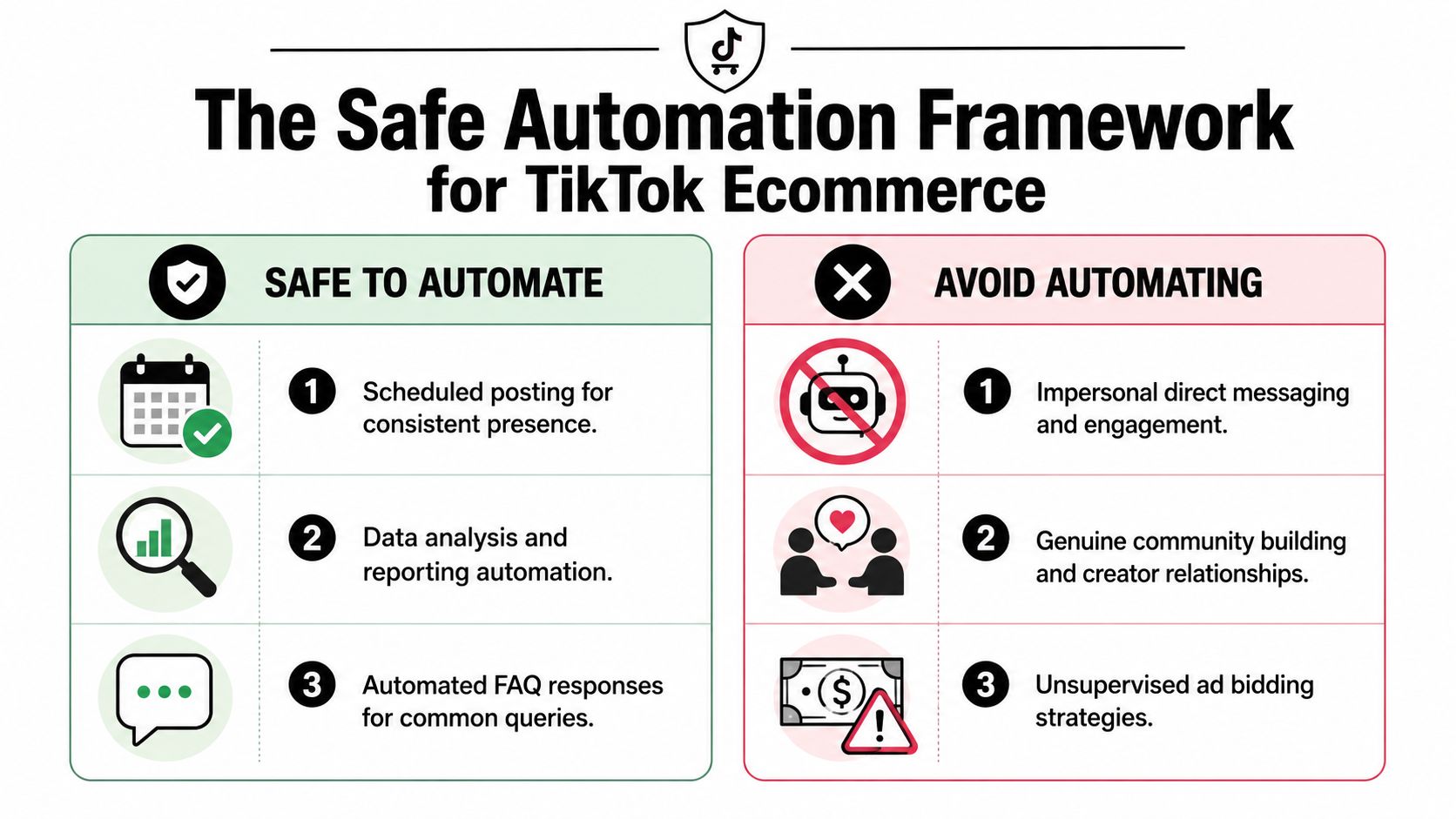
The cleanest filter is this: if the workflow is repetitive, back-end, and rule-based, it's usually a safer automation candidate. If it imitates human behavior in public or affects money without oversight, treat it as high risk.
Recent guidance reflects that shift. TikTok automation has moved away from follower-growth bots toward safer workflows built around the official Content Posting API, with risky actions heavily constrained. One example often cited is keeping follow behavior tightly limited, including guidance such as no more than 25 follows per hour, in this Octoparse breakdown of TikTok automation tools and limits.
What safe TikTok automation actually looks like
Think in layers, not tools.
- Publishing layer: Schedule approved posts through API-connected tools.
- Research layer: Monitor trends, competitors, sounds, and content categories.
- Inbox layer: Auto-tag or route common questions, then escalate edge cases.
- Reporting layer: Pull performance data into one recurring dashboard.
- Lead layer: Capture intent from comments or DMs and push it into your CRM or follow-up workflow.
On the other side, there are workflows I'd keep on a short leash.
- Public engagement simulation: Auto-liking, auto-following, or generic comments.
- Relationship work: Creator outreach that feels templated and impersonal.
- Ad controls without guardrails: Rules that move budget aggressively without review.
- Nuanced support conversations: Returns, complaints, and product objections.
TikTok Automation Risk Assessment
| Task | Risk Level | Rationale & Best Practice |
|---|---|---|
| Scheduling posts through approved workflows | Low | Safest when done through official posting infrastructure and a planned content calendar. |
| Trend monitoring and competitor tracking | Low | Back-end research doesn't mimic user behavior and helps you make better creative decisions. |
| Analytics reporting and content categorization | Low | Repetitive and structured. Ideal for automation because the output is internal. |
| FAQ auto-replies to simple questions | Medium | Useful when tightly scoped. Review scripts often and route edge cases to a human. |
| Comment lead capture and CRM sync | Medium | Strong use case if the system tags intent correctly and hands off quickly. |
| Creator outreach at scale | Medium to High | Templates help, but relationship quality drops fast if every message sounds automated. Human review matters. |
| Auto-follow or follow/unfollow tactics | High | Behavior-based automation is constrained and can raise account health concerns. |
| Mass liking or generic comment bots | High | This is the classic spam pattern. Avoid it. |
| Fully unsupervised ad automation | High | Let systems assist, but don't remove human budget review on a small account. |
Safe TikTok automation doesn't try to look human. It removes repetitive operations around the human work.
For ecommerce brands, that framing keeps decisions simple. If a tool promises growth by simulating activity, skip it. If it saves time on research, scheduling, tagging, or reporting, it's worth testing.
Automating Your Content Engine from Ideation to Publishing
A good TikTok content engine doesn't start in the editor. It starts in research.
The easiest way to waste time is automating production before you've found formats the platform is already rewarding. A better workflow is to automate discovery, shortlist repeatable content ideas, then build lightweight templates that you can publish consistently.

Start with discovery, not production
One practical method is to use a separate research account and train that feed around faceless formats, niche content, and adjacent products. A 2024 tutorial also suggests checking trends in other languages or countries through a VPN to find under-developed ideas before they become crowded, as described in this YouTube walkthrough on TikTok automation opportunities.
That matters for small-budget stores because you don't need to invent a format from scratch. You need to spot patterns early enough to adapt them to your product.
A simple research loop works well:
- Collect recurring hooks: Save intros, camera angles, and edit styles that keep appearing.
- Tag by format, not topic: “Problem demo,” “satisfying pack shot,” “voiceover testimonial,” and “comparison clip” are more useful tags than broad niche labels.
- Track repeatability: If a format needs a studio, a creator team, or constant new footage, it won't fit a lean ecommerce setup.
Build repeatable content recipes
Once you have patterns, turn them into content recipes. A recipe is a repeatable structure with variables swapped in each time.
For example, a skincare brand might build:
- Hook slot: one pain-point line
- Proof slot: one product-in-use clip
- Objection slot: one text overlay
- CTA slot: one direct next step
A kitchen gadget store might use:
- Mess/problem opener
- Quick transformation demo
- Close-up of result
- Comment prompt or product CTA
The automation here isn't about making every video automatically. It's about standardizing inputs so your editing, briefing, and approvals move faster.
Use API-based scheduling for the final step
Publishing should be the most boring part of your process. That's good.
Use a scheduler that relies on official posting infrastructure, queue approved creatives in batches, and separate your calendar by format. If one format starts working, you can increase its share of the content mix without rebuilding the system.
This video gives useful context on how operators think about TikTok workflow automation in practice:
A lean publishing board usually needs only a few columns:
- Research queue: raw ideas, trend notes, saved references
- Ready to produce: concepts that fit your product and constraints
- Approved to schedule: edited, reviewed, captioned
- Live and tracking: published posts waiting for analysis
The best content automation setup doesn't produce more noise. It makes your next good post easier to ship.
Building an Automated UGC and Creator Discovery Pipeline
UGC usually breaks down for the same reason email follow-up does. The work isn't difficult. It just gets messy fast.
A founder spots a good creator, sends a DM, forgets to log the conversation, loses the shipping details, then can't find the final asset later. Automation helps most when it turns that pile of loose tasks into one visible pipeline.
A lean pipeline that a small brand can actually run
Start with inputs you already have. Brand mentions, product keywords, niche hashtags, tagged posts, comments asking for proof, and customers who post unprompted are all signals.
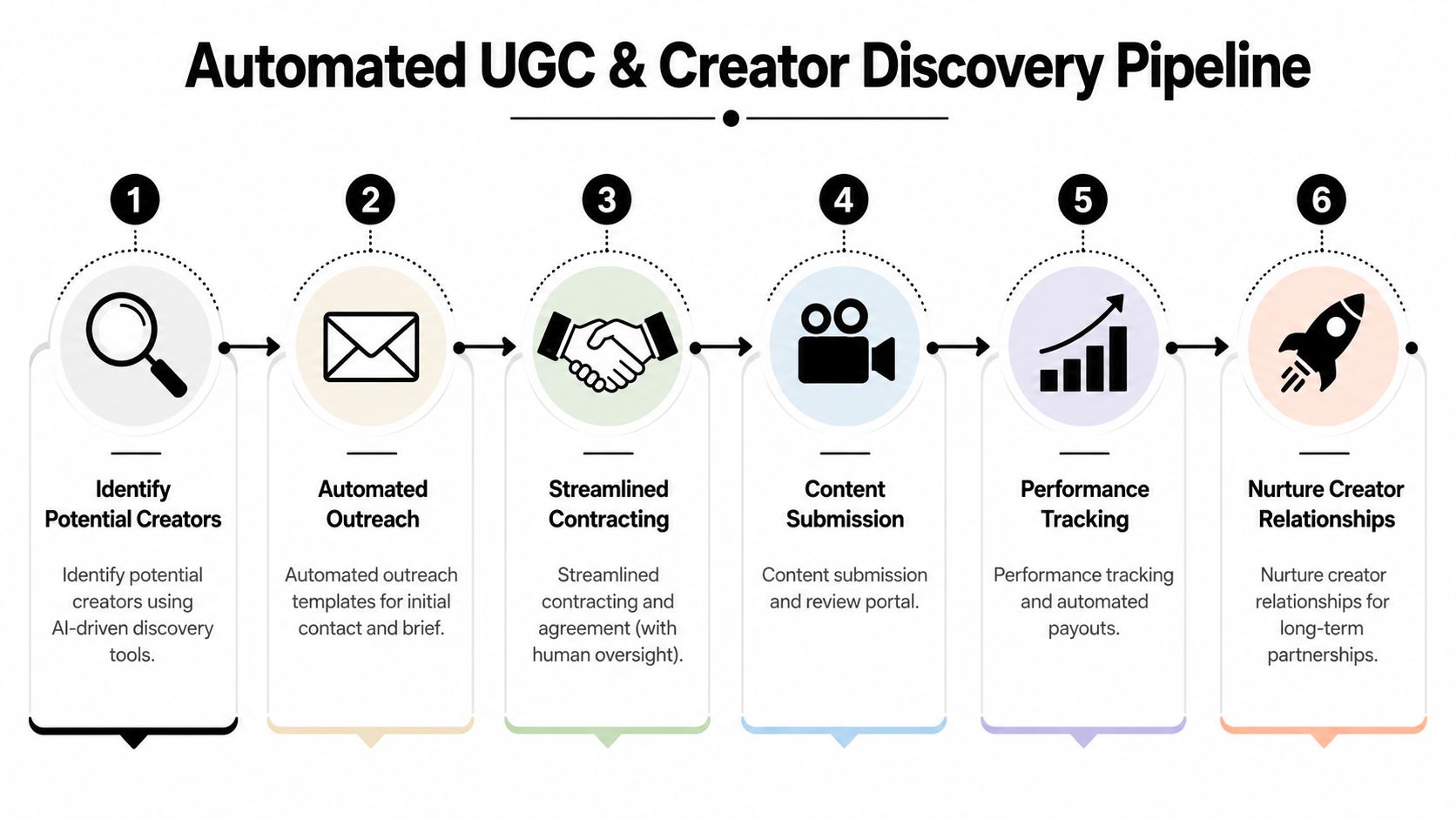
A simple creator pipeline might look like this:
- Discovery inbox: Collect mentions, tagged posts, and creator profiles into one review queue.
- Qualification sheet: Track product fit, on-camera presence, style, audience relevance, and whether the person already posts in your category.
- Outreach templates: Use structured first-contact messages, but customize the first line and the brief.
- Asset library: Store approved videos with tags for hook, angle, product, usage rights, and performance notes.
- Reuse queue: Move top assets into organic reposting, paid testing, or landing-page use after review.
This is where CRM logic helps. The strongest automations don't just send messages. They move information cleanly from one step to the next.
A practitioner guide on TikTok marketing automation emphasizes that some of the most valuable automations are instant responses and CRM syncing, including systems that reply to messages and comments, qualify leads, segment audiences, and pass data into sales tools. It also notes that a reply delay of 2+ hours can reduce conversion rates, which is why speed matters in inbound conversations, as covered in this Cotera article on TikTok marketing automation tools.
Where automation helps and where it should stop
Automation is useful at the edges of creator work.
Use it to:
- Flag candidate creators from recurring keywords or brand mentions
- Log every interaction into a simple tracker
- Tag submitted assets so you can find them later
- Trigger reminders for approvals, briefs, and usage checks
Don't let it take over the relationship itself.
A creator can tell when every message is a template. So can a customer whose video you want to reuse. The faster route is often the worse route if it strips out context, appreciation, or clarity.
A semi-automated creator pipeline beats a fully automated one because creator work is still relationship work.
For low-budget brands, the win is operational. You don't need a massive ambassador program. You need a system that helps you notice good creators early, respond fast, and keep approved content organized enough to reuse.
Smart Automation for TikTok Ads and Lead Generation
With paid traffic, most automation mistakes come from optimizing the wrong layer. Founders automate bids or budgets before they automate measurement. That order usually leads to noisy decisions.
On TikTok, the more useful benchmark is full-funnel visibility. TikTok's ad tooling includes automation layers that can coordinate creative, media, and measurement. Independent guidance also recommends using attribution models, conversion windows, and the Events API to evaluate outcomes across impressions, reach, CPM, video views, CPA, and conversion counts, as detailed in this TikTok full-funnel automation and measurement article.

Automate measurement before you automate spend
If you're working with a small budget, use automation to answer three questions first:
- Which creatives earn attention? Track thumb-stopping ability through view metrics and watch how that lines up with downstream actions.
- Which traffic converts? Compare click-through and view-through attribution so you don't over-credit a weak ad.
- Which steps stall? Look for campaigns that generate interest but not product-page actions or conversions.
That gives you a base for simple rules. Not aggressive autopilot. Just clear guardrails.
For example:
- Pause creatives that spend without showing downstream conversion signals.
- Move winning hooks into new variants instead of endlessly editing one ad.
- Separate prospecting creative from remarketing creative so reporting stays readable.
If you're coming from Meta, many of the same thinking patterns around attribution discipline still apply. This guide on generating leads on Facebook is useful because the core lesson carries over: lead systems work best when response flow and measurement are tied together.
Use lightweight lead automation close to the sale
Lead automation on TikTok is strongest when it sits near real buyer intent.
Good examples:
- A comment workflow that tags “link?” or “price?” questions for fast follow-up
- A DM auto-response that handles simple product questions before routing to a person
- A form or CRM handoff when someone asks about wholesale, bundles, or availability
Weak examples:
- Generic DM blasts
- Auto-replies that ignore the actual question
- Long scripted sequences that feel copied from another platform
The right setup is narrow. It handles the obvious path and escalates the rest.
Operator note: If you can't explain how an automated reply helps the buyer move one step closer to purchase, it probably shouldn't be live.
For budget-conscious stores, that's enough. You don't need a huge ad automation stack. You need a clean reporting loop, a controlled testing process, and a fast way to catch purchase intent when it shows up.
Measuring Your Automation ROI and Staying Compliant
If automation is working, you should feel it in two places. Your team spends less time on repetitive tasks, and your business gets clearer signals.
The trap is measuring the wrong thing. More scheduled posts or more automated replies doesn't mean the system is helping. Track outcomes that connect to revenue, response quality, and operating speed.
Track business outcomes, not busywork
A simple dashboard can stay lean. It just needs to cover the handful of metrics that tell you whether the workflow is useful.
Include measures like:
- Content throughput: how many approved posts get shipped on schedule
- Lead handling speed: how quickly inbound questions move from comment or DM to a useful response
- UGC pipeline health: how many creator conversations become usable assets
- Ad efficiency signals: impressions, reach, CPM, video views, CPA, and conversion counts tied to attribution logic already covered earlier
- Time saved: whether scheduling, reporting, and tagging now happen without manual copying
For founders who want a cleaner way to think about reporting discipline, this breakdown of ad performance metrics is a strong reference point. The same principle applies on TikTok. Vanity metrics are easy to automate. Decision metrics are harder and more valuable.
The compliance habits that keep automation useful
Staying compliant isn't one setting. It's a routine.
Use these habits:
- Review every front-facing automation regularly: Scripts drift. Offers change. Customer language changes.
- Keep a human on nuanced replies: Product complaints, shipping issues, creator negotiations, and sensitive customer questions need judgment.
- Prefer official infrastructure when available: If a workflow can run through approved posting or measurement tools, choose that over behavior simulation.
- Watch for warning signs: Odd engagement patterns, poor reply quality, or platform friction usually mean the automation is doing too much.
- Document what each tool does: If you can't describe the trigger, output, and fallback path, the workflow is too opaque.
The long-term version of TikTok automation isn't flashy. It's controlled, measurable, and boring in the right places. That's why it works.
If you're a first-time store owner and want a simpler system for planning creatives and launch decisions without hiring an agency, Social Loop AI is worth a look. It helps ecommerce founders turn a product URL into a practical ad plan, creative angles, and brand-aware assets fast, which makes it easier to test offers and content without getting buried in manual setup.