Blog
How to Scale Facebook Ads: Grow Your Ecom in 2026
Published July 11, 2026
You launch a product, test a few ads, and finally see sales come in. One ad set looks better than the rest. The natural move is to raise the budget and try to get more of what's already working.
That's where many first-time advertisers burn money.
Learning how to scale Facebook ads isn't just about pushing spend higher. It's about checking whether the thing you're about to amplify is stable enough to survive more pressure. If your ad is shaky, your offer is weak, or your landing page leaks conversions, scaling only makes the problem bigger.
Most beginners don't need a scaling trick first. They need a pre-scale audit.
Table of Contents
- The Hidden Reason Most Scaling Attempts Fail
- The Pre-Scale Audit Is Your Ad Actually Ready
- Vertical Scaling The 20 Percent Budget Rule
- Horizontal Scaling Finding New Pockets of Customers
- Your Scaling Playbook Vertical vs Horizontal Strategy
- Troubleshooting Scaling Issues Guardrails And Fixes
The Hidden Reason Most Scaling Attempts Fail
A beginner gets a few conversions, opens Ads Manager, and thinks the answer is simple. More budget in, more sales out.
That logic feels right. It's also where a lot of accounts go off the rails.
The issue is that most scaling advice treats growth like a mechanical budget task. But campaigns with average order values under €40 and CTRs below 1% typically fail to scale profitably because the algorithm lacks enough conversion signals, according to AdMetrics on Meta ads scaling plateaus. That's a common situation for first-time dropshippers, especially when the store is new and traffic volume is thin.
A campaign can look promising and still be too fragile to scale. One decent day doesn't prove the ad is stable. A few sales don't prove the landing page is convincing. And a cheap CPM doesn't save a weak offer.
You wouldn't put a bigger engine in a car with bad tires. More power only makes the weakness show up faster.
This is why so many budget increases feel cursed. The problem usually wasn't the act of scaling. The problem was that the campaign wasn't ready to be scaled in the first place.
What beginners often misread as a winner
A lot of “winners” are just incomplete signals.
- A lucky spike: One day performs well, but the next days don't hold.
- A cheap click trap: The ad gets attention, but the landing page doesn't convert that attention.
- A weak economics setup: The product price leaves too little room for rising acquisition costs.
- A low-signal account: Meta can't optimize well if the campaign isn't generating enough consistent conversion data.
When people ask how to scale Facebook ads, they usually mean, “How do I increase spend without wrecking performance?” The honest answer is this. You start by finding out whether the current performance is real.
If it is, scaling becomes controlled. If it isn't, scaling becomes expensive market research.
The Pre-Scale Audit Is Your Ad Actually Ready
You raise budget on Monday because Sunday looked strong. By Tuesday, CPA is up, add-to-carts are weaker, and you are stuck wondering whether the problem is the ad, the audience, or the store.
That pattern is common with new dropshipping accounts. The mistake happens before the scale attempt. More spend does not fix a weak setup. It exposes it faster.
Check the baseline before you touch budget
Start with one question. Are you looking at a repeatable result or a short burst of luck?
A campaign that is ready for more budget usually shows the same general behavior across several days. ROAS stays near your acceptable range. CPA does not swing hard without a clear reason. Purchases come in often enough that you are not building your decision around one good afternoon.
Meta's own guidance on the learning phase in ad delivery supports the same idea in practice. Stable optimization needs enough consistent conversion feedback. If results are thin or erratic, budget increases often create more noise instead of more profit.
Use a simple pass or fail check:
- ROAS is close to target across multiple days.
- CPA is steady enough that a budget increase will not break the margin.
- Conversions are recurring, not clustered in one spike.
- Spend is pacing normally without strange delivery jumps.
If you need a refresher on which numbers deserve attention before a scale decision, review these ad performance metrics for paid campaigns.
Check whether Meta has enough signal to optimize
Beginners often try to scale while the account is still learning who buys. That is expensive.
Meta works better when it sees repeated conversion behavior. If your campaign has only produced a handful of purchases, the system is still making rough guesses. Raising budget at that stage is like asking a new employee to work twice as fast before they know the job.
A simple gut check helps here. If you still feel the need to refresh Ads Manager every hour, the campaign probably has not earned a scale test yet.
Audit the creative before you blame the audience
A lot of weak campaigns get scaled because one metric looks good. Usually it is CTR or CPC. Neither one matters much if the people clicking are not the right people.
Look at the creative in sequence:
- Hook: Does the first second call out the problem, product, or outcome clearly?
- Angle: Is the ad selling one clear reason to care, or stacking too many claims?
- Expectation match: Does the landing page continue the same promise the ad made?
- Proof: Does the ad give a buyer a reason to believe you beyond the product shot?
If comments are confused, click-through is decent, and purchase rate is weak, the audience may not be the issue. The ad may be attracting curiosity instead of buying intent.
Audit the landing page like a bottleneck
The ad gets the click. The page closes the sale.
I check the product page before I test new audiences because that is where a lot of wasted spend hides. More traffic into a weak page just means you lose money faster. Common pre-scale problems look like this:
- Message mismatch: The ad pushes one angle, but the page opens with something else.
- Weak first screen: Visitors cannot tell what the product is, who it helps, or why it is worth the price.
- Missing trust: Shipping details, reviews, guarantees, and clear product info are hard to find.
- Friction in the path: Variant selection, add-to-cart, or checkout steps feel clumsy.
A good pre-scale audit should end with a clean decision. Scale when the ad converts with consistency, the account has enough signal, and the page carries the click without friction. Hold budget when one of those pieces still looks shaky. That is how beginners avoid paying for lessons they could have caught in advance.
Vertical Scaling The 20 Percent Budget Rule

You audit the ad, the product page looks solid, and sales are coming in at a cost you can live with. Then the usual mistake happens. You raise budget too hard, too fast, and a campaign that was stable yesterday starts buying worse traffic today.
Vertical scaling means increasing spend on a setup that already proved it can convert. For a beginner, that sounds safer than launching new tests. In practice, it can burn money faster than testing if you force the system to spend before it has enough room to scale cleanly.
Why small budget moves work better
A good default is simple. Raise budget in small steps, usually around 20%, then wait a day or two before touching it again. Farsiight's guide to Facebook ad scaling recommends gradual increases for the same reason experienced buyers do. Big jumps can reset delivery patterns and hurt efficiency.
The logic is straightforward. If an ad set was spending $50 profitably, moving it to $60 gives Meta a little more room to find similar buyers. Moving it to $100 asks for a very different volume of impressions right away. That extra spend often gets pushed into weaker auctions, lower-intent users, or placements that did not matter at the smaller budget.
That is why beginners often say, “It was working until I scaled it.”
The campaign did not always “die.” You changed the conditions too aggressively.
How to apply the rule without creating noise
Keep the process boring. Boring scales better.
A simple routine looks like this:
- Raise the budget by a modest amount.
- Leave the campaign alone for 24 to 48 hours.
- Judge performance on blended results, not one shaky hour.
- Increase again only if CPA, conversion rate, and spend quality still look stable.
That waiting period matters. Meta needs time to redistribute spend and find where the next chunk of budget can go. If you edit too soon, you create a second variable before the first one settles.
I see beginners make the same mistake all the time. They increase budget in the morning, see a rough afternoon, swap the creative at night, then blame “scaling” the next day. That is not a scaling problem. That is messy testing.
For a broader framework on controlling growth without wasting budget, this guide to marketing spend optimization for paid campaigns is useful.
After you've let the campaign breathe, this walkthrough can help frame the pacing visually:
When CBO helps and when it doesn't
CBO works best after you already have proof. During early testing, ABO is usually easier because you control how much each ad set spends. Once you have clear winners, CBO can help Meta shift more budget toward stronger ad sets inside one campaign.
CBO works like one manager controlling the team budget. If one ad set is finding cheaper purchases, Meta can feed it more spend without waiting for you to rebalance things manually.
That helps when:
- You already have two or more ad sets with real purchase data.
- Performance is stable enough that extra budget has somewhere productive to go.
- You want Meta to shift spend between proven segments instead of forcing equal budgets.
It does not help when the inputs are weak.
If every ad set is average, CBO just moves money between average ad sets. If one ad set is carrying the campaign and the rest are weak, CBO can also pull spend into places you would not have chosen manually. That is the trade-off. You get flexibility, but you give up some control.
For a first-time dropshipper, the safest approach is simple. Scale the thing that is already earning the right to scale. Raise budget in small steps, make one change at a time, and treat vertical scaling like adding weight to a barbell. A little more is productive. Too much too soon wrecks the set.
Horizontal Scaling Finding New Pockets of Customers
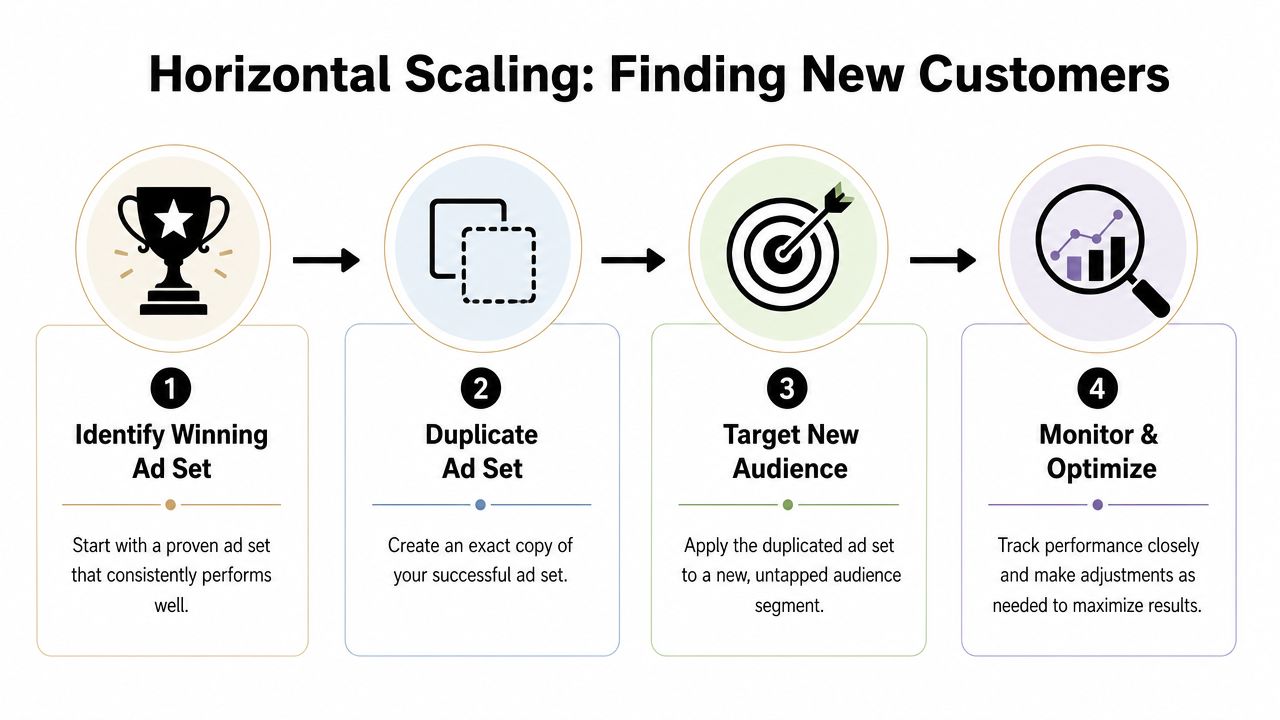
You raise budget on one winner, performance slips, and now you do not know whether the audience capped out, the ad got tired, or Meta just lost the thread. Horizontal scaling solves a different problem. It helps you grow by testing nearby opportunities while keeping your original winner untouched.
For a beginner, that is usually the safer move.
Start from the control and change one variable
Use the ad set that already proved it can get purchases. Duplicate it. Keep the parts that are doing the heavy lifting, then change one input at a time so you can read the result clearly.
A common example is a simple Problem to Solution ad. The hook names the pain point, the creative shows the product in use, and the CTA matches the promise on the landing page. If that setup is working, do not rebuild it because you are bored with it. Keep the structure. Test around it.
Good single-variable tests look like this:
- Audience only: Same ad, different audience
- Hook only: Same audience, new opening angle
- Message framing only: Same offer, different first line or pain point emphasis
New dropshippers often break the test before it starts. They duplicate an ad set, swap targeting, rewrite the copy, change the creative, and adjust the CTA in one pass. If results improve, you do not know why. If they get worse, you still do not know why.
Expand audiences in a controlled order
Horizontal scaling works best when you move outward in small steps. Keep the original audience live as your control. Then test nearby segments that give Meta more room without throwing away the signal that made the first ad set work.
A practical sequence:
- Keep the winner live: If a 1% lookalike works, leave it alone.
- Test one step wider: Duplicate into a 3% lookalike.
- Add one new audience type: Try a relevant interest stack or a broader lookalike.
- Reduce overlap when possible: Do not let ad sets fight for the same people if you can avoid it.
The goal is simple. Find another pocket of buyers that responds to the same offer without asking one ad set to carry the whole account.
That matters more than beginners think. A lot of scaling attempts fail because the advertiser assumes the ad set is strong enough for more spend, when the issue is that the current result came from one narrow slice of traffic. Horizontal scaling helps you check whether the win is repeatable.
Scale the concept, not just the targeting
Audience expansion is only half the job. Strong accounts also stretch the winning idea into a few close creative variants.
If one ad is working, identify what is making it work. Usually that comes down to the hook, the visual, or the CTA. Then build new versions that keep the core idea intact.
| Creative element | What to vary |
|---|---|
| Hook | Change the opening pain point or promise |
| Visual | Swap product shot, UGC frame, or context |
| CTA | Match the next step to the angle more clearly |
This is a better habit than making random "new creatives" every few days. You are testing a pattern, not starting over.
If you want a clean system for rotating these experiments without making the account messy, this guide on round robin testing for creative experiments is a useful framework.
One warning. Do not use horizontal scaling to hide weak fundamentals. If a duplicate only works when you narrow the audience harder, discount more aggressively, or rely on one lucky creative, the account is not ready to scale. It is still in the audit stage.
A winning ad is a repeatable pattern. Horizontal scaling helps you prove whether that pattern can travel.
Your Scaling Playbook Vertical vs Horizontal Strategy
A beginner usually asks which method is better. That's the wrong question. The right question is what problem you're trying to solve.
If you need safer growth and more optionality, go horizontal first. If you've already found a durable winner and want to push it carefully, go vertical.
Use horizontal first when you need safety
Horizontal scaling is usually the better starting point for small accounts.
Why:
- It lowers concentration risk: You're not dependent on one ad set.
- It protects your control: The original winner stays untouched.
- It teaches you faster: You learn whether the offer works across different audiences and message variants.
- It fits beginner reality: Most new advertisers still need to discover where the product resonates best.
This method is especially helpful when your current campaign works, but you're not fully convinced it can carry significantly more spend on its own.
Use vertical when the winner is proven
Vertical scaling makes sense after you've built confidence. Not emotional confidence. Account-level confidence.
That means the campaign has already shown it can hold performance without drama, and you've resisted the urge to keep editing it. In that situation, increasing budget is less about gambling and more about controlled exploitation.
Use vertical scaling when:
- The campaign has a stable baseline
- The audience still has room
- The ad still feels fresh
- You want to get more from a proven setup before launching more tests
If you only have one winner, don't rush to squeeze everything out of it. Build a small bench first.
Vertical vs. Horizontal Scaling At a Glance
| Attribute | Vertical Scaling (Budget Up) | Horizontal Scaling (Audience Out) |
|---|---|---|
| Core move | Increase budget on an existing campaign | Duplicate a winner into new audiences or creative variants |
| Main goal | Maximize a proven performer | Find more scalable pockets of demand |
| Risk level | Higher if done too fast | Lower because the original remains untouched |
| Best use case | A stable campaign you trust | A promising winner you want to expand safely |
| Learning value | Lower, because you're pushing one setup harder | Higher, because you discover what else can work |
| Beginner fit | Better after proof | Better at the start of scaling |
The playbook I'd give a first-time dropshipper is simple.
Start with horizontal scaling to build a portfolio of workable paths. Once a few patterns emerge, apply vertical scaling carefully to the strongest one or two campaigns. That sequence is slower than panic scaling, but it's much less likely to torch your budget.
Troubleshooting Scaling Issues Guardrails And Fixes
Scaling almost never moves in a clean straight line. Performance dips. Costs wobble. What matters is whether you know what failed.
The quickest way to lose money is to guess.
When CPA jumps after a scale attempt
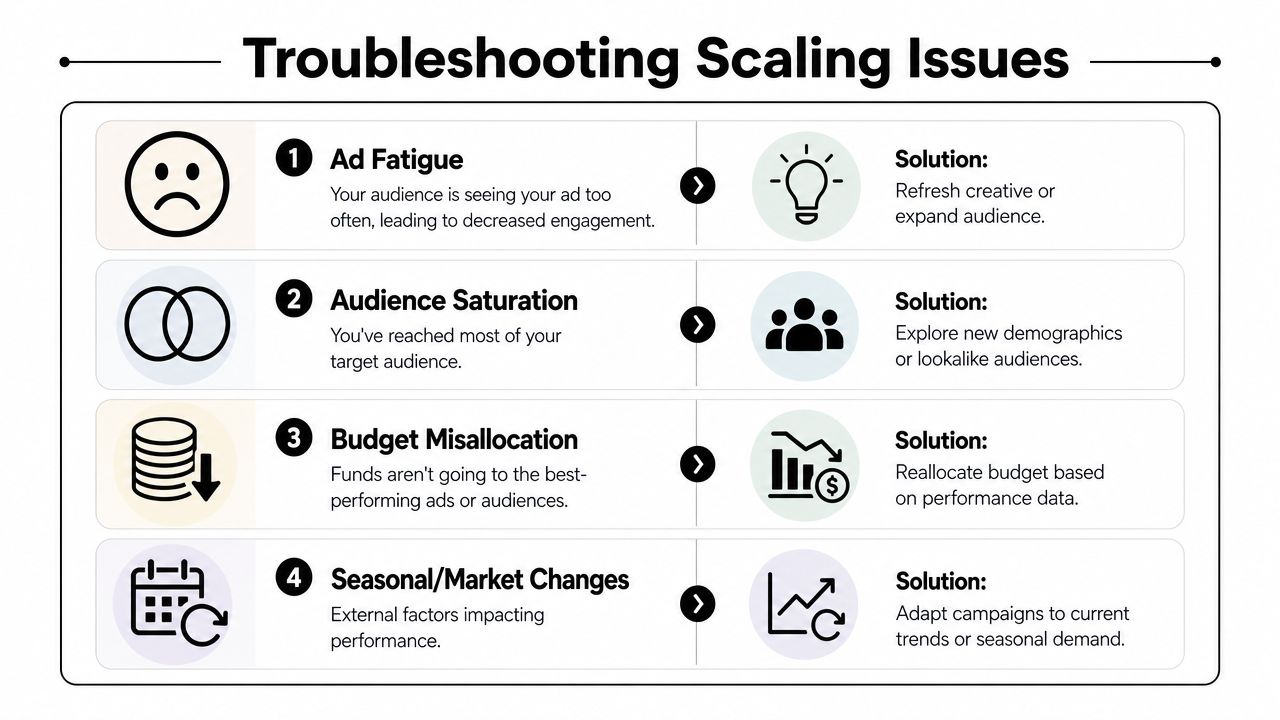
If CPA spikes right after you increased budget, the first suspect is the budget change itself. Don't immediately blame the product, page, or audience.
Run a simple check:
- If the jump followed a recent budget increase: Pull back the pace. Stop making new edits and let the campaign settle.
- If the spike appeared after multiple changes: Reverse the extra edits first. Mixed changes muddy the signal.
- If the rise keeps holding: Treat the previous spend level as the campaign's current ceiling.
A lot of beginners make this worse by chasing the drop. They increase budget, see weak results, then keep editing every few hours. That usually turns a temporary wobble into a full breakdown.
If you can't identify the cause of the dip, stop changing things until you can.
When the audience is fine but the creative is tired
Sometimes the audience still has room, but the ad has lost freshness. You'll usually feel this before you can explain it cleanly. The same message starts looking stale, comments repeat, and clicks feel less intentional.
That's not always an audience problem. It's often a creative rotation problem.
Try this sequence:
- Keep the offer the same
- Refresh the opening hook
- Change the visual framing
- Tighten the CTA to match the angle more clearly
If the ad originally won on social proof, refresh the proof. If it won on a problem-aware hook, sharpen the pain point. Don't toss the whole concept if the underlying angle still makes sense.
When your first angles don't produce a winner
Most beginner advice falters at this stage. It assumes you already found something worth scaling.
But many solo founders test their first few angles and get nothing decisive. The first 3-5 ad angles often fail to perform, and beginners need a budget-aware system for angle-driven creative iteration when that happens, as discussed in Robb Fahrion's post on scaling ads without wasting budget.
That doesn't automatically mean the product is dead or the audience is wrong. Often the hook is weak, the CTA is mismatched, or the creative angle doesn't address the buyer's real objection.
A practical reset looks like this:
- Keep one thing constant: Don't rewrite the whole account at once.
- Return to objections: What is the buyer unsure about?
- Build narrower creative angles: UGC, social proof, identity, fear of missing out, or a cleaner problem-solution frame.
- Stop wasting warm traffic: If your cold creative hasn't proven itself, don't hide weak top-of-funnel work behind retargeting hope.
This is the guardrail most first-time advertisers need. If you don't have a real winner yet, your job isn't to scale. Your job is to create clearer tests until one angle earns the right to be amplified.
If you want help before you waste budget, Social Loop AI is built for first-time dropshippers and new ecommerce owners who need a practical Meta ads launch plan, angle-based creatives, and a landing-page readiness check before scaling. It turns a product URL into a guided ad system so you can test, diagnose, and scale with more control instead of guessing in Ads Manager.