Blog
Demographic Targeting: A Meta Ads Guide for Dropshippers
Published May 19, 2026
You've got a product page live, a small budget in Ads Manager, and one big fear: wasting money on the wrong people.
That's where demographic targeting usually enters the conversation. New dropshippers hear “target women 25 to 44” or “go after high-income buyers” and assume that's the strategy. It isn't. It's a starting filter.
Used well, demographic targeting helps you avoid obvious mismatches and organize early tests. Used badly, it narrows your audience too fast, locks you into weak assumptions, and gives Meta less room to learn. The smarter play is to use demographics to shape your first test, then let strong creative do the heavier lifting.
Table of Contents
- What Is Demographic Targeting Really
- How Demographic Targeting Works on Meta Ads
- When to Use Demographics Instead of Other Targeting
- A Beginner's Guide to Setting Your Initial Demographics
- Common Demographic Targeting Pitfalls and How to Avoid Them
- Beyond Demographics The Social Loop AI Method
What Is Demographic Targeting Really
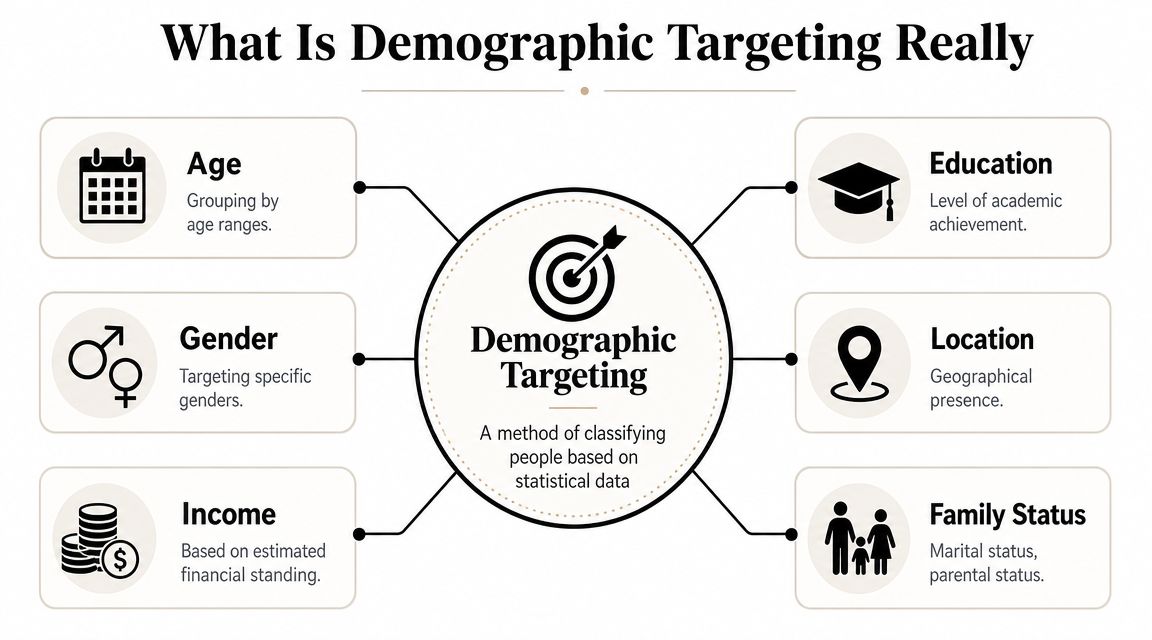
Demographic targeting means grouping people by statistical traits such as age, gender, income, education, location, marital status, or parental status, then using those groups to shape ad delivery. That's the practical version of what marketers have been doing for years, and it has evolved from broad market segmentation into a measurable ad-delivery system that platforms support directly, as explained in Pangea's demographic targeting overview.
The basic idea
Consider mail sorting. If you throw every letter into one pile, delivery gets sloppy. If you sort by area, building, and apartment, delivery gets cleaner. Demographic targeting does the same thing for ads. It helps you send the right message to a more relevant slice of people instead of blasting everyone.
That matters most when your budget is small. If you sell a product that clearly fits a certain life situation, broad delivery can waste spend on people who were never likely to care. Demographics give you a first layer of control.
The main demographic categories
Some demographic inputs are obvious. Others are more useful than beginners realize.
- Age helps you separate life stages. A product for college routines, first apartments, or retirement comfort won't speak the same way to every buyer.
- Gender can matter when the product is visually, functionally, or culturally tied to one group. It matters less when the product solves a broad problem.
- Location affects shipping speed, language, buying norms, and even the style of ad that feels natural.
- Income matters when the offer sits in a premium or budget-sensitive category.
- Education and occupation can shape tone, proof style, and channel fit.
- Family status changes buying priorities fast. Parents, single buyers, and couples often respond to different objections.
Practical rule: Demographics are useful when they help you remove obvious mismatch, not when they push you into guessing too much.
Beginners often treat demographic targeting like a magic accuracy tool. It's not. It's more like a decent first sketch. It gives structure to your first tests and helps you avoid pure guesswork, but it doesn't tell you exactly why someone buys.
What makes demographic targeting valuable is that it connects directly to campaign decisions. You're not just describing a customer. You're deciding who sees the ad, which angle they see, and what kind of message gets tested first. For a new store, that's enough. You don't need a perfect profile. You need a sensible first hypothesis.
How Demographic Targeting Works on Meta Ads
Meta makes demographic targeting feel simple, which is both helpful and dangerous. Helpful because the controls are easy to find. Dangerous because easy controls can trick you into thinking they're precise.

Where the controls show up
Inside Meta Ads Manager, the key demographic levers usually sit at the ad set level. That's where you choose:
- Age range
- Gender
- Location
- Language, when relevant
- Detailed targeting, which can include things like parental status, education-related traits, and life-event style audience options
If you're still getting familiar with the platform, this overview of Facebook ads basics for ecommerce helps map the moving parts before you start layering audiences.
Google Ads shows the clearest example of how platforms operationalize demographics. Advertisers can adjust delivery and bidding by age, gender, parental status, and household income, including examples like raising bids for ages 35 to 54 or targeting the top 30% of U.S. household incomes through specific income brackets, as documented in Google Ads demographic targeting help.
The exact controls and data quality differ between platforms, but the lesson is the same. Demographics aren't just descriptive labels. They affect delivery decisions.
What to change and what to leave broad
Most beginners should only touch a few demographic settings at first.
Use this rule set:
| Setting | Good reason to narrow | Good reason to stay broad |
|---|---|---|
| Age | Product clearly fits a life stage | Product solves a cross-age problem |
| Gender | Product is truly gender-specific | Product appeal is mixed or giftable |
| Location | Shipping, language, or market fit matters | You're testing several viable countries |
| Detailed targeting | You need a strong proxy like parents | You're still unsure who responds |
A common mistake is stacking too many filters before you have data. For example, selecting a tight age band, one gender, a narrow city list, and a few detailed targeting traits can leave Meta with very little room to find buyers.
Use the video below if you want a visual walkthrough of demographic controls and campaign setup logic inside Meta's environment.
Start with the fewest restrictions that still make business sense. Every extra filter should earn its place.
For a dropshipper chasing a first sale, demographic targeting on Meta works best when it answers a simple question: “Who is most obviously a fit for this product right now?” If you can answer that without overfitting, you're using it correctly.
When to Use Demographics Instead of Other Targeting
Choosing an audience type isn't about what sounds smarter. It's about what matches the product.
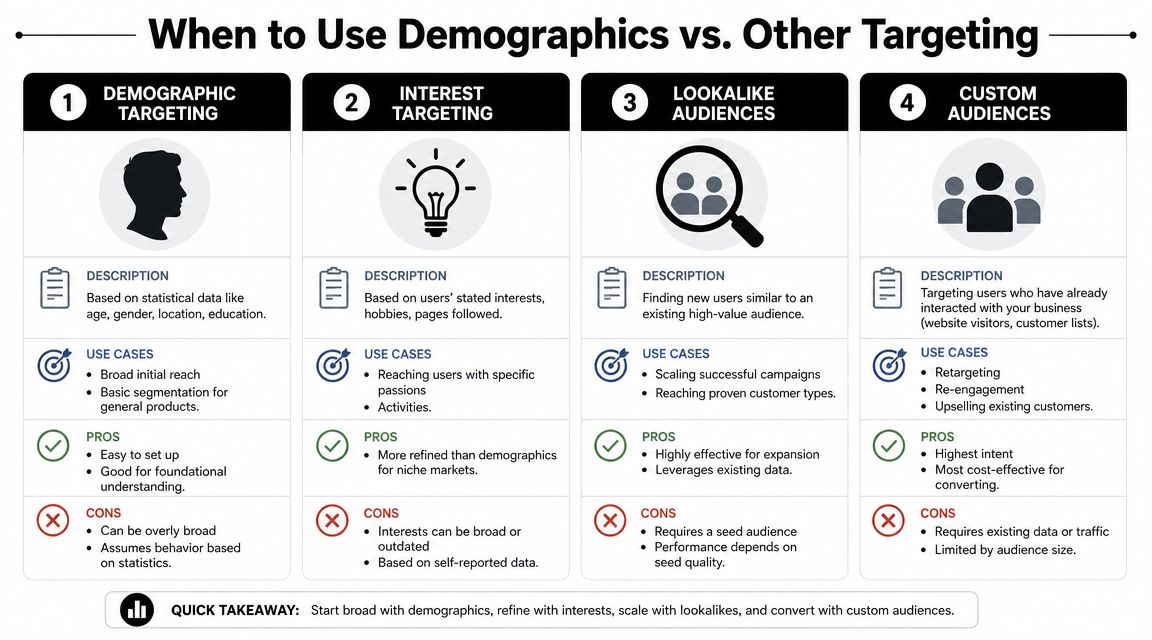
Demographics tell Meta who a person is in broad statistical terms. Interests hint at what they like. Custom audiences use prior interaction. Lookalikes try to find similar people based on an existing seed. Broad targeting gives the algorithm more room and leans harder on creative and conversion signals.
A simple decision framework
Use demographics first when the product has an obvious fit tied to identity or life stage.
Examples:
- Skincare for visible aging concerns: age can be a reasonable starting filter.
- Postpartum support products: parental status or recent-life-stage cues may help.
- Men's grooming tool: gender can be a clean first cut.
- Dorm-room organizer: younger age bands may make sense.
Use interest targeting when the product belongs to a hobby, fandom, or strong category behavior. Think pet gear, fishing accessories, yoga items, or gaming setup products.
Use custom audiences when you already have traffic, video viewers, page engagers, or customer lists. That's usually the highest-intent pool you own.
Use lookalikes when you have a decent seed source and want expansion based on what's already working.
How each option behaves in practice
SurveyMonkey's guidance is the useful middle ground here. Demographics work best as part of a segmentation workflow, where age, location, and family status are grouped into clusters and then mapped to channels, offers, and creative decisions, rather than treated like one flat label, as described in SurveyMonkey's marketing demographics guide.
That's why this simple comparison helps:
- Demographic targeting is strong when the buyer fit is obvious and you need a fast first hypothesis.
- Interest targeting is better when passion or category behavior matters more than identity.
- Lookalike audiences are useful after you've got signal from real visitors or buyers.
- Custom audiences are for retargeting and re-engagement, not cold-start discovery.
If your product solves a universal problem, broad plus better creative often beats a pile of narrow demographic assumptions.
For new dropshippers, the safest move is usually one of these two paths:
- Clear demographic fit product. Start with demographics and keep the rest simple.
- No clear demographic fit product. Stay broader and test multiple angles.
That second path is becoming more important. A lot of products don't fail because the audience was wrong on paper. They fail because the ad angle didn't connect.
A Beginner's Guide to Setting Your Initial Demographics
Most beginners build audiences backwards. They open Ads Manager first, click targeting options, and then try to justify them. Start with the product.
Start with the product not the platform
Ask three plain questions before touching a setting:
- Who uses this product most naturally?
- Who buys it even if they don't use it?
- What life situation makes the offer feel urgent?
That gives you a working audience idea without pretending you already know the winner.
If you're still shaping your early customer acquisition plan, this breakdown of generating leads on Facebook can help you connect audience choices to offer structure and landing-page intent.
Here's a simple way to think through your first demographic choices:
- Age first: If the product clearly belongs to a life stage, narrow modestly. If not, keep it broader. Many first-time advertisers cut age too hard and remove buyers they never considered.
- Gender second: Choose one gender only when the product or message is clearly designed around that buyer. If the product can be bought for self-use or as a gift, broader often makes more sense.
- Location third: Pick markets where your shipping, language, and customer expectations are realistic. Fast fulfillment and clean checkout matter more than theoretical audience size.
- Income indirectly: If your product is premium, think about price sensitivity in your angle and offer. On Meta, beginners often use adjacent signals and product positioning rather than trying to force exact income assumptions.
Build your first audience hypothesis
A good first audience setup is a testable guess, not a personal belief.
Use this worksheet:
| Question | Example answer |
|---|---|
| Product | Posture support brace |
| Core buyer | Adults who work long hours seated |
| Likely age pattern | Broad working-age audience |
| Gender relevance | Mixed |
| Location need | Countries with reliable ecommerce delivery |
| Price sensitivity | Moderate, so value and relief angle matter |
From there, build one primary audience and one contrast audience.
Primary audience
- Broad enough to let Meta learn
- Obvious demographic fit only
- One main message angle
Contrast audience
- Slightly different age band, gender split, or location cluster
- Same product, different framing
- Used to test whether your first assumption was too narrow
Don't overcomplicate this with fake precision. A product for tired parents doesn't always need a “parent” filter. Sometimes the better ad says what the buyer is dealing with directly.
Try these starting rules:
- Keep age wider than your instinct says
- Don't split by gender unless the product demands it
- Avoid stacking detailed targeting on day one
- Choose locations based on operations, not ego
- Write the ad to call out the buyer's situation clearly
One practical habit helps a lot: write down why each demographic choice exists. If you can't explain a filter in one sentence, remove it. That discipline saves money because it stops random audience stacking.
Common Demographic Targeting Pitfalls and How to Avoid Them
The biggest mistakes in demographic targeting usually come from wanting certainty too early.
The narrow audience trap
A new advertiser finds a product for women, decides it's probably for mothers, picks a tight age band, narrows to a handful of cities, adds a few interest layers, then wonders why delivery is unstable and costs feel ugly. Meta didn't fail there. The setup did.
Over-filtering creates three problems:
- It limits learning: the system gets fewer chances to find responsive buyers.
- It raises the cost of being wrong: a bad assumption hurts more when the audience is tiny.
- It hides creative weakness: you blame targeting when the ad itself isn't convincing.
If your budget is tight, resist the urge to “laser target” before you have proof.
Why demographic data is less precise than it looks
There's a bigger issue. Modern demographic data often isn't as exact as advertisers assume.
Rozee Digital summarizes a contrarian but useful point: socio-demographic targeting can be flawed, and one study it cites found that over half of users fell into overlapping age groups, with inferred demographics sometimes materially inaccurate, which is why demographic filters should be treated as a weak starting hypothesis rather than a precise truth, as discussed in Rozee Digital's demographic targeting guide.
That matters because many advertisers still act like age, gender, or status filters are clean lines. They aren't always clean. In privacy-first ad systems, platforms often infer or model pieces of audience data.
The more uncertain the signal, the more your creative has to do the sorting.
This is also why acquisition costs can drift when a store keeps tightening audiences instead of improving message-to-market fit. If you're trying to understand that pressure on spend, this guide to cost per acquisition in paid campaigns is a useful companion.
The fix isn't to abandon demographic targeting. The fix is to downgrade its role. Use it to remove obvious mismatch. Don't use it as your only bet.
Beyond Demographics The Social Loop AI Method
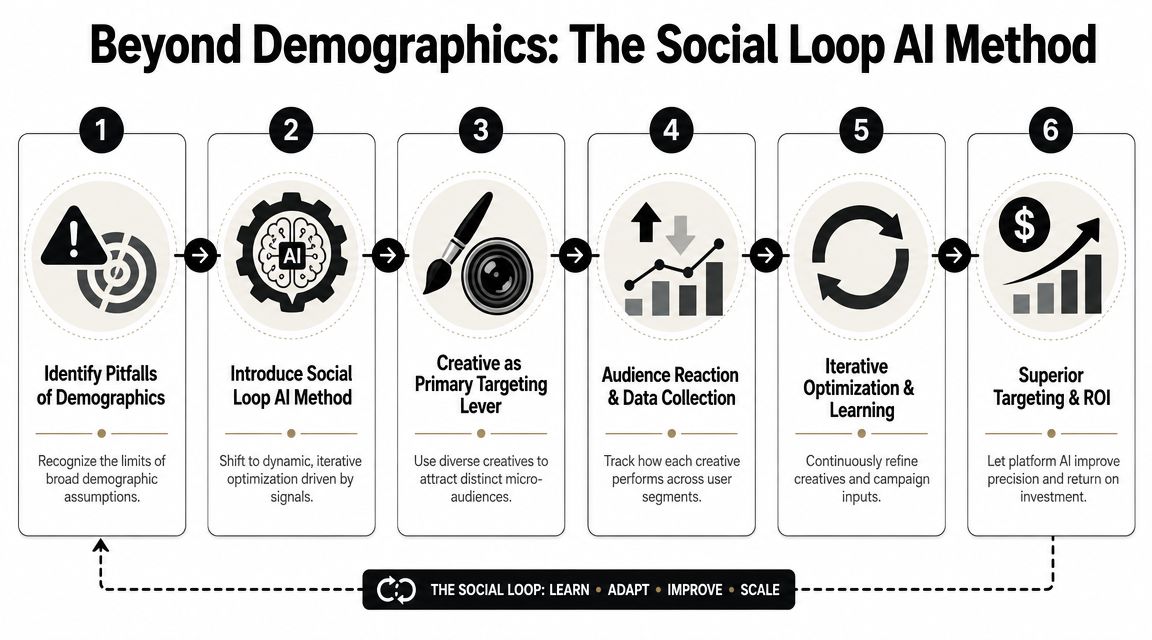
Demographics are static labels. Buyers aren't static.
A person in the same age bracket can respond for completely different reasons: pain relief, convenience, identity, giftability, status, fear of missing out, or price sensitivity. Invesp makes this point well by showing how broad demographic buckets hide multiple motivations, including examples like Gap targeting families, teens, and professionals rather than one simple profile in its demographic segmentation analysis.
That's why creative-led testing is more resilient than demographic-only thinking.
Creative is the new targeting
When advertisers say “creative is the new targeting,” they don't mean demographics are useless. They mean the ad itself often does a better job of attracting the right buyer than a stack of narrow filters.
A strong angle causes self-selection.
Examples:
- A problem-solution ad pulls in buyers who actively feel the pain.
- A UGC-style demonstration attracts people who need proof that the product works in normal life.
- A social-proof angle helps cautious buyers who don't want to be first.
- An identity-based angle speaks to buyers who want the product to match how they see themselves.
- A price-defense or value angle can pull in budget-sensitive shoppers better than any guessed income bracket.
This is the practical shift. Instead of saying, “I need women aged X to Y,” you ask, “What ad message would make the right buyer stop scrolling and feel understood?”
Broad audience, sharp message. That combination often beats narrow audience, generic message.
For first-time ecommerce advertisers, this usually means testing multiple hooks against a sensible audience instead of rebuilding audiences every time performance dips.
How to run creative-led tests on a small budget
Here's a lean workflow that works better than endless audience fiddling.
-
Set a basic demographic frame
Keep only the obvious constraints. If the product is clearly gender-specific, use that. If shipping requires certain countries, use those. Leave the rest open unless there's a strong reason not to. -
Write three to five distinct angles
Don't make five versions of the same ad. Make different arguments. One can lead with pain. Another with convenience. Another with identity. Another with before-and-after style transformation if that fits your product and platform rules. -
Keep the offer constant at first
If you change the audience, creative, landing page, and offer all at once, you won't know what caused the result. -
Read engagement as feedback
Watch which angle earns clicks, holds attention, or creates stronger purchase intent signals. The audience is telling you which message fits. -
Refine after response appears
Once a creative angle starts separating itself, then you can decide whether demographic splits are worth testing around it.
In such situations, a structured tool can help. Social Loop AI turns a product URL into a Meta ads launch plan, suggests buyer profiles and angle-based creatives, and organizes tests around objections and hooks so a beginner isn't guessing from scratch.
The important part isn't the tool. It's the method. You stop treating demographic targeting like the final answer and start using it as the frame around a creative experiment.
That approach is more durable for three reasons:
- It matches how people buy. Motivation beats neat labels.
- It handles noisy data better. If demographic signals are imperfect, self-selection through creative becomes more valuable.
- It protects small budgets. You waste less time rebuilding audiences and spend more time testing messages that can sell.
A first sale usually doesn't come from finding the perfect age bracket. It comes from finding the ad that makes the right person say, “That's for me.”
If you want a practical way to build that kind of launch plan, Social Loop AI helps first-time dropshippers turn a product page into buyer profiles, angle-based ad concepts, and a budget-aware Meta testing workflow without needing an agency.