Blog
AI UGC Ads: The Complete Guide for Ecommerce Beginners
Published August 5, 2026
UGC-style ads deliver 4x higher click-through rate and 50% lower cost per acquisition than traditional brand ads on Meta and TikTok. AI UGC ads are automated ads designed to look like authentic creator content, built with AI tools instead of a hired creator.
Table of Contents
- What Are AI UGC Ads
- How AI UGC Ads Differ From Real UGC
- Benefits and Risks for Ecommerce Beginners
- Building AI UGC Ads a Step-by-Step Workflow
- Launch and Testing Your First AI UGC Campaign
- Legal and Compliance Basics
- How Social Loop AI Fits the Workflow
- Conclusion and Frequently Asked Questions
What Are AI UGC Ads
The reason these ads matter is simple. A 2025 benchmark summarized by AdConvert found that UGC-style ads drove 3.2% average CTR vs. 0.8%, $12.40 vs. $24.80 CPA, and 73% vs. 51% ad recall on Meta and TikTok, alongside the headline 4x higher CTR and 50% lower CPA versus traditional brand creative. Those numbers point to a clear behavior shift, buyers are scrolling past polished brand ads and stopping for content that feels native, casual, and creator-led. AdConvert's 2025 UGC-style ad benchmark
AI UGC ads sit inside that same pattern. They use software to generate or assemble creator-style ad creative, so the final result looks like someone talking naturally about a product, even though the production happens through AI rather than a filmed creator session.
Why the format works
The format works because it reduces the visual distance between the ad and the feed. A glossy brand spot often feels like advertising from the first frame, while a creator-style video feels like something a real person would post, which lowers resistance. That doesn't mean the content is fake in a sloppy sense, it means the structure is built to match how people already consume social video.
Practical rule: if your product needs quick explanation, AI UGC can earn attention fast. If your product depends on deep emotional credibility, the format needs more care.
For a first-time ecommerce owner, that distinction matters more than the tool itself. You're not buying “AI” as a buzzword, you're buying a faster way to produce feed-native creative that can be tested before you sink money into a full production cycle.
A plain-language definition
Think of AI UGC ads as UGC-style creative without the creator shoot. You still get the same core pieces, a hook, a body, a call to action, but they're generated or assembled through AI tools. For beginners, that's useful because it turns ad creative into a repeatable process instead of a one-off gamble.
The trade-off is that the format succeeds only when it still feels believable. Once the copy sounds too polished, the pacing feels artificial, or the visual language drifts too far from a normal social post, the ad loses the very quality that made it worth testing in the first place.
How AI UGC Ads Differ From Real UGC
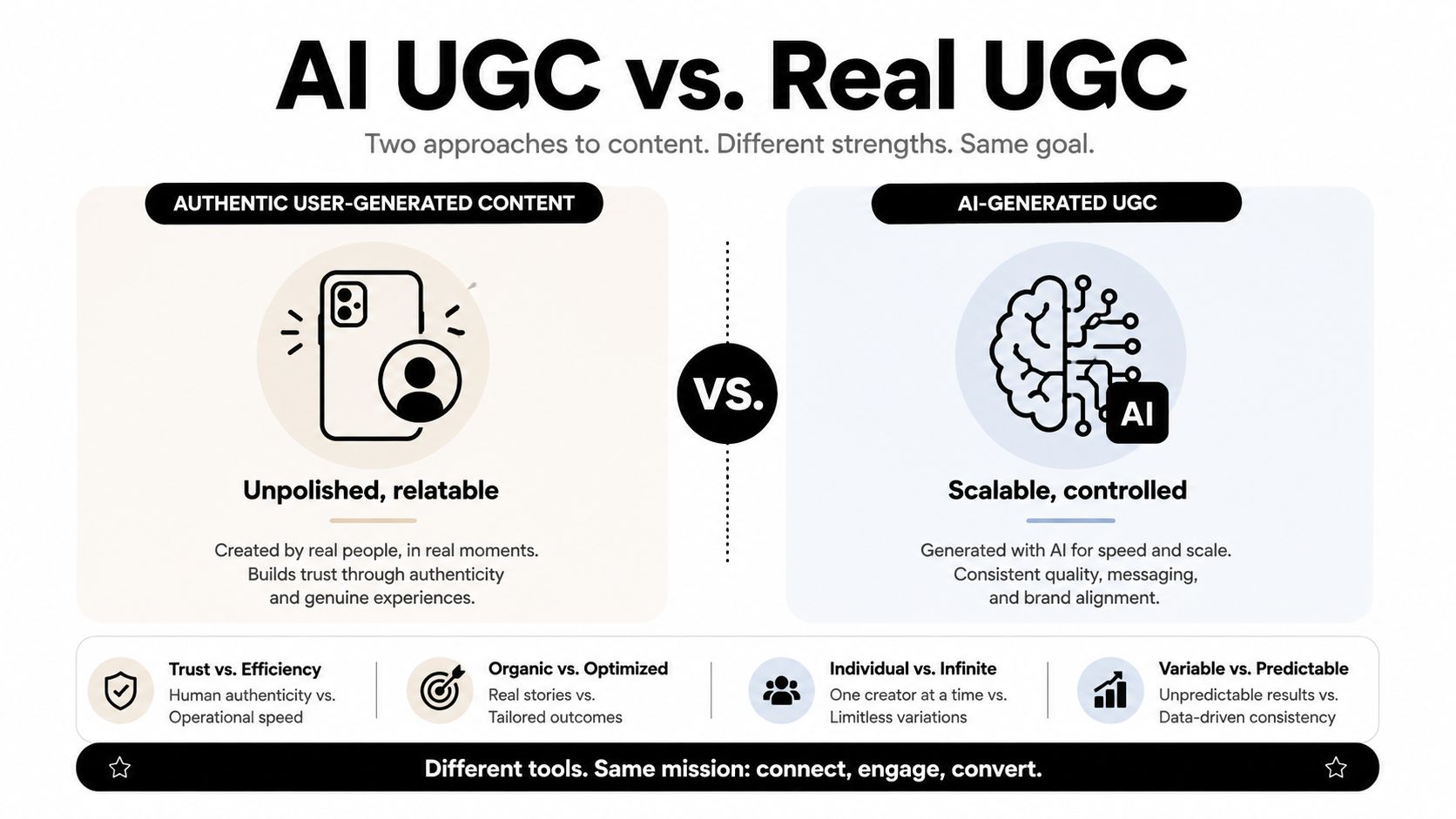
Real UGC comes from a person filming themselves, usually in their own space, with their own voice, timing, and imperfections. AI UGC recreates that feel with software, which makes it easier to control the message, iterate the angle, and produce more variants without coordinating a shoot. That difference is bigger than a technical preference, because it changes what kind of trust the ad can earn and what kind of buyer it can persuade.
Where each format wins
RevenueCat's guidance is a useful way to split the two formats. AI-generated ads work best when you need utility, speed, or low-cost variation, while real humans are stronger when the job calls for trust or emotional nuance. In practice, AI UGC fits product demos, feature walkthroughs, and direct-response testing, while founder stories and testimonial-led ads usually perform better with a real face and a real voice. RevenueCat on generated ads and UGC
For a first-time store owner, the question is not which format is more modern. The better question is what the ad has to prove. A product that needs to show how a gadget works can often do that with a synthetic presentation. A product asking people to trust your brand with their money, health, or identity usually needs a human presence that feels lived-in.
If you are still learning how to make the creative look native to the feed, our guide to making UGC-style content is a useful companion before you start testing angles.
The trust ceiling matters
AI UGC hits a ceiling when the message depends on lived experience. A creator saying “this fixed my problem” carries a different weight than a generated face saying the same words, even if the script is strong. That gap gets wider in markets where audiences are already cautious about synthetic media, and RevenueCat notes that some regions, including Europe, tend to be more sensitive to uncanny-valley content.
Use this split: AI UGC for structured explanation, real UGC for credibility-heavy persuasion.
The practical takeaway is simple. Match the format to the job. If you are testing a new offer, AI can help you learn faster. If you are trying to convince a skeptical buyer, authentic creator proof still carries more force. AI UGC serves a different purpose than real UGC, a tool for specific jobs rather than a universal replacement.
A simple decision lens
Before making anything, ask three questions.
- Is the goal explanation or belief? Explanation leans toward AI UGC, belief leans toward real UGC.
- Will the buyer care more about speed or sincerity? Speed favors AI, sincerity favors a human face.
- Does the market have low tolerance for synthetic media? If yes, keep AI usage tighter and more transparent.
That is the core difference. One format helps you explain and test quickly, the other helps you earn belief where the buyer needs a stronger human signal.
Benefits and Risks for Ecommerce Beginners
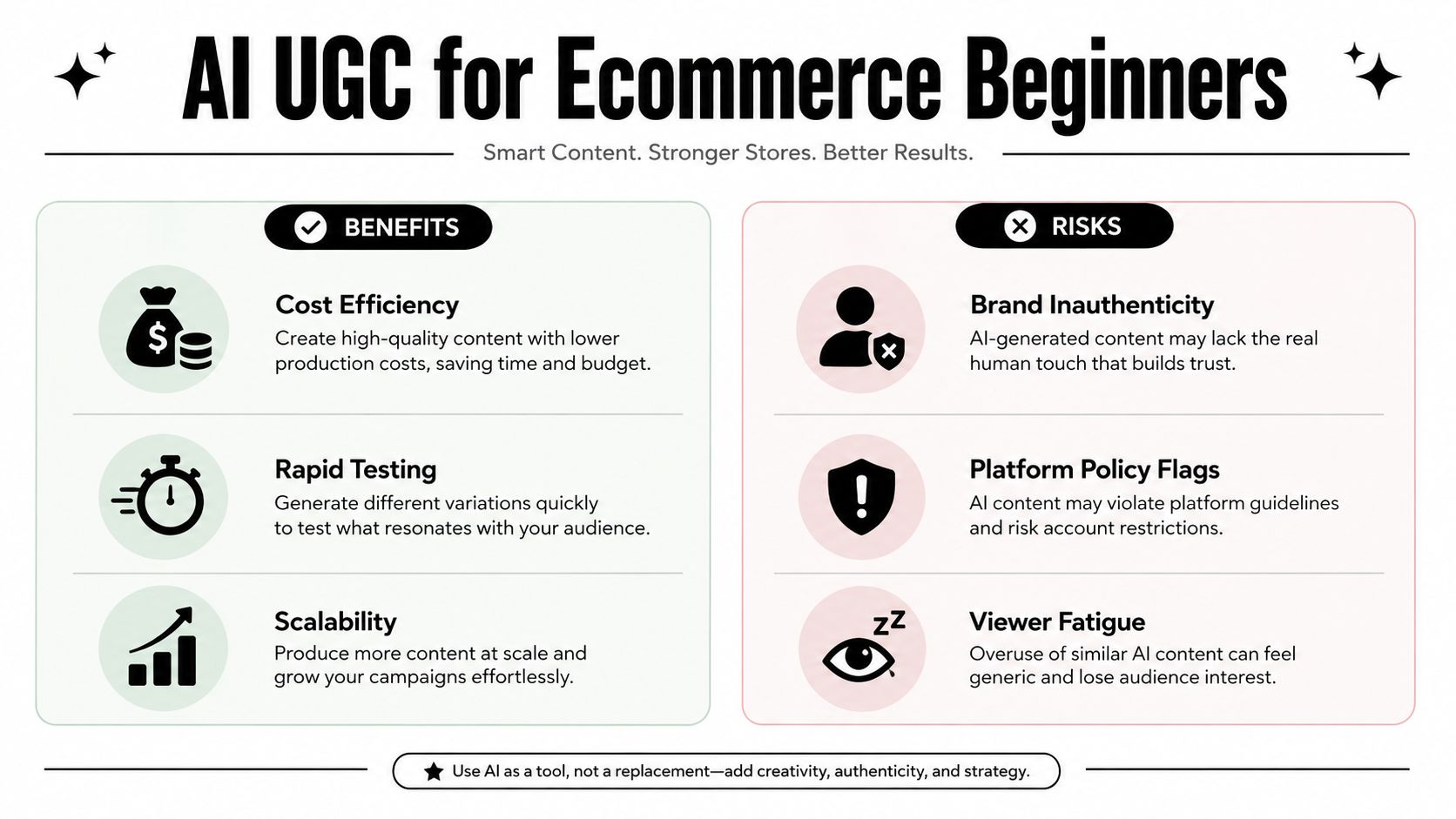
The reason AI UGC exploded into a mainstream workflow is that teams started using it at scale, not just experimenting with it. A 2026 industry roundup from UGC.ai says 68% of marketing and creative teams were using at least one AI-powered content tool in 2025, up from 29% in 2023, and it describes AI-assisted teams as testing 5 to 10 times more structural ad variants per product per week than teams depending only on manual creator sourcing. It also says AI UGC production costs fell from about $150 to $500 per real-creator video to roughly $0.50 to $5 per render. UGC.ai's 2026 AI content roundup
What the upside looks like in practice
For a first-time store owner, the biggest benefit is not “automation” in the abstract. It's the ability to run more creative tests before your product momentum cools off. When you're on a tight budget, speed matters because each day spent waiting on a creator brief or revision cycle is a day you're not learning which angle sells.
AI UGC also helps with consistency. If you need five angles for one product, the tool can keep the brand framing, formatting, and message structure aligned instead of handing you a mixed bag of creator styles. That makes it easier to compare performance cleanly, which is exactly what a beginner needs when the ad account is still small.
The risks you can't ignore
The first risk is the trust ceiling already covered above. A synthetic ad can explain, but it can't always persuade in a high-emotion or high-skepticism category. If your audience wants proof from a real person, AI may create clicks without creating confidence.
The second risk is testing noise. Beginners often generate too many variations without a clear hypothesis, then blame “the creative” when the core problem is messy testing. More versions do not automatically mean better learning.
The third risk is viewer fatigue. A feed filled with nearly identical synthetic ads starts to feel repetitive fast, especially if the hooks, pacing, and visuals all point to the same template.
Budget reality: AI UGC helps most when your money is better spent on testing than on production polish.
That's why the format works best for ecommerce beginners who need learning speed. It's not magic, and it's not always the final answer. It's a lower-cost way to discover what deserves a bigger spend later.
Building AI UGC Ads a Step-by-Step Workflow
A workable AI UGC process starts with the product page, not with random script ideas. Feed the system your product URL or product description, then build outward from one clear angle instead of trying to say everything at once. A clean workflow keeps the ad grounded in the product, which is where beginners usually drift off track.
Start with one proven angle
Pick one of the classic direct-response angles first, such as Problem to Solution, UGC testimonial, Social Proof, FOMO, or Identity. The point is to give the ad a job, not a personality quiz. If your product solves a specific pain point, lead there. If it needs social proof, make the proof the center of the ad.
From there, generate several hook options for the first three seconds. That opening matters more than the rest of the script because it determines whether the scroll stops. For beginners, the best hooks are usually plain, specific, and tied to a real frustration or desired outcome.
Use prompt blocks, not vague instructions
A lot of weak AI creative comes from vague prompts. Be more direct.
- Hook prompt: “Write 5 opening lines for a vertical ecommerce ad for [product]. Each line should target a different angle, problem, curiosity, result, social proof, and urgency.”
- Body prompt: “Turn the selected hook into a short product demo that shows the product in use, explains the benefit in simple language, and avoids exaggerated claims.”
- CTA prompt: “Write 5 call-to-action lines that sound natural in a creator-style ad, and match the selected angle.”
Those prompts work because they force the model to make one decision at a time. Hook first. Body second. CTA last. That's the same logic you want in a real creative brief.
Match the format to the platform
TikTok in-feed ads are optimized for vertical 9:16, with 1080×1920 px as the recommended target, 540×960 px as the technical minimum, and MP4/MOV accepted. Keeping files under about 100 MB can reduce upload and transcoding friction, and shorter 9 to 15 second cuts are repeatedly used because they tend to maximize completion and engagement in feed environments. TikTok AI UGC technical guide
That means the creative isn't finished when the script is done. It's finished when the file matches the platform's delivery expectations and the pacing fits the feed. A strong script with the wrong format still loses.
A guided tool can compress the process
Some platforms try to turn this into a single guided flow. Social Loop AI, for example, takes a product URL, audits the landing page, defines a buyer profile, and turns a budget into a launch plan with creative angles, copy, hooks, CTAs, layouts, and palettes. If you're a beginner, that kind of workflow can reduce the number of decisions you have to make at once, which matters when you're trying to launch without an agency. Social Loop AI creative workflow
Operational rule: don't generate everything at once. Build one angle, one hook family, one body, then test that cluster before expanding.
Launch and Testing Your First AI UGC Campaign
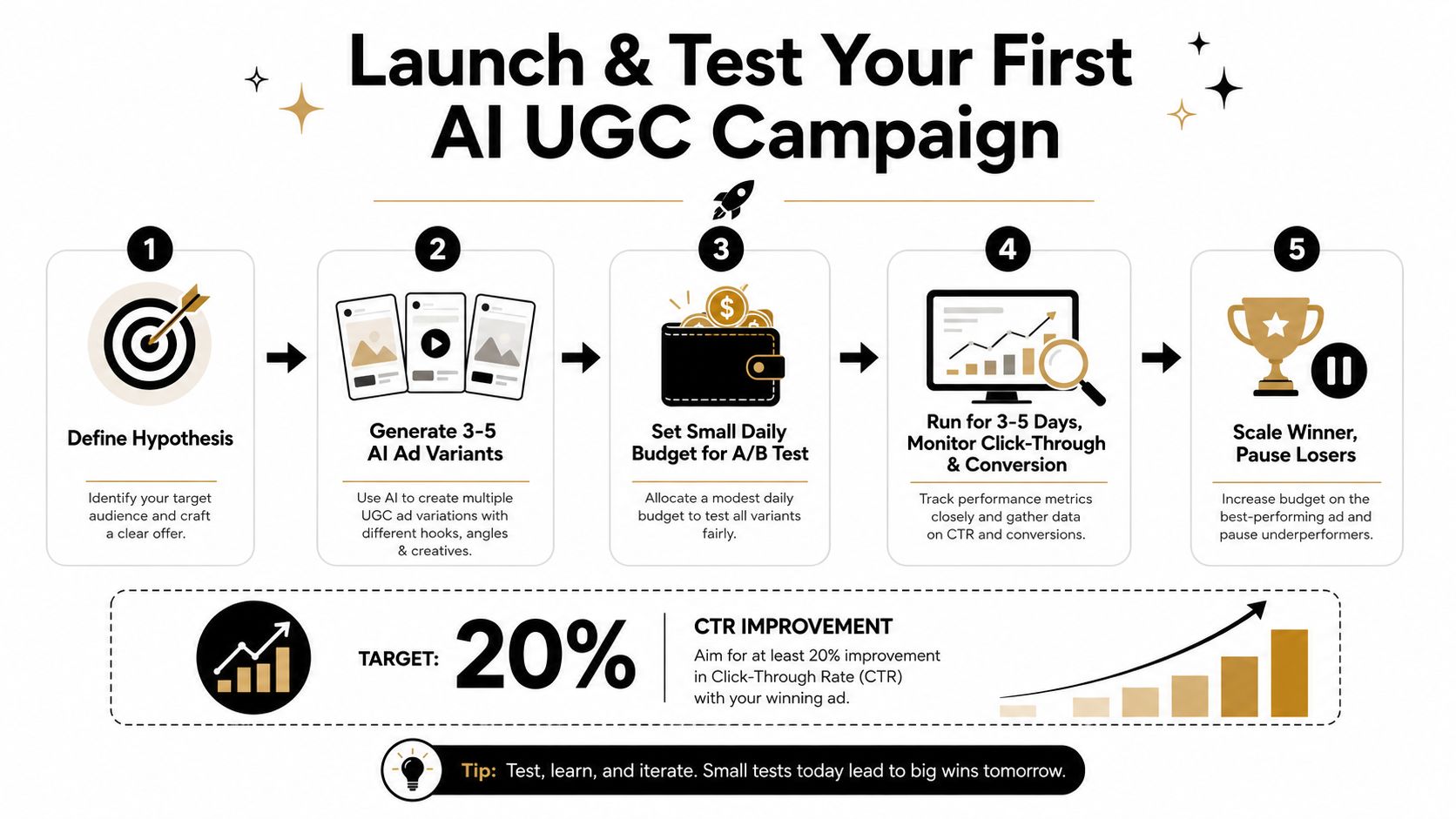
A first test should tell you which message earns attention, not just which design looks nicest in your draft folder. The cleanest way to do that is variable isolation, not random iteration. One expert workflow recommends a 3 hooks × 3 bodies × 3 CTAs matrix, which creates 27 variants that can be launched in a single ad set so the auction can surface early winners. Cinerads on AI UGC testing structure
How to use a tight budget without guessing
If you're working with a limited budget, keep the test simple and disciplined. Use one product, one audience, and one angle family, then let the creative variables do the work. A beginner's mistake is to change the offer, the audience, and the creative all at once, which leaves you with no clear answer when performance shifts.
Run the campaign long enough to let early signal appear, then look for patterns instead of reacting to every small fluctuation. The useful question is not “did this ad win today?” It's “which hook-body-CTA combination is showing a repeatable response?”
Read the signals the right way
- Strong signal: one hook consistently draws more clicks across multiple bodies and CTAs.
- Weak signal: all versions underperform from the start, which usually points to the angle or offer.
- Fatigue signal: the ad starts well, then CTR gradually softens as the same audience sees it again.
That distinction matters because beginners often pause a creative too early. A bad ad looks bad right away. A fatigued ad has already worked and then lost steam.
The launch logic is straightforward. Start with a structured matrix, watch for early winners, and keep your decisions tied to one variable at a time. If you're not sure whether the problem is the hook or the offer, the matrix will usually show you which part is failing before you spend too much.
If you're mapping this to Facebook rather than TikTok, use the same discipline. Keep the hypothesis narrow, test the variables cleanly, and treat the first round as learning, not as a final verdict. Facebook ads testing strategy for AI UGC
Legal and Compliance Basics
AI UGC ads don't sit outside disclosure rules just because software made them. The FTC endorsement guidelines still require clear disclosure when content is sponsored or paid, and that applies when an AI-generated ad imitates a creator testimonial. In the EU, the AI Act adds transparency expectations for AI-generated content, so audiences need to be informed when the media is synthetic.
Platform policies make this more specific. Meta and TikTok both have their own advertising and synthetic-media rules, and those can vary by region and format. The safest habit is to assume the platform, the market, and the offer all matter at the same time.
A simple launch checklist helps.
- Disclosure language: confirm the ad includes clear sponsored or AI-generated disclosure where required.
- Regional review: flag markets with stricter sensitivity to synthetic media before launch.
- Platform fit: check that the creative matches the ad platform's disclosure and ad policy language.
- Claim review: make sure any testimonial-style wording doesn't overstate what the product can do.
The mistake most beginners make is treating compliance as a post-launch cleanup task. It's cheaper to slow down for one review than to spend money on an ad that gets flagged or damages trust.
How Social Loop AI Fits the Workflow
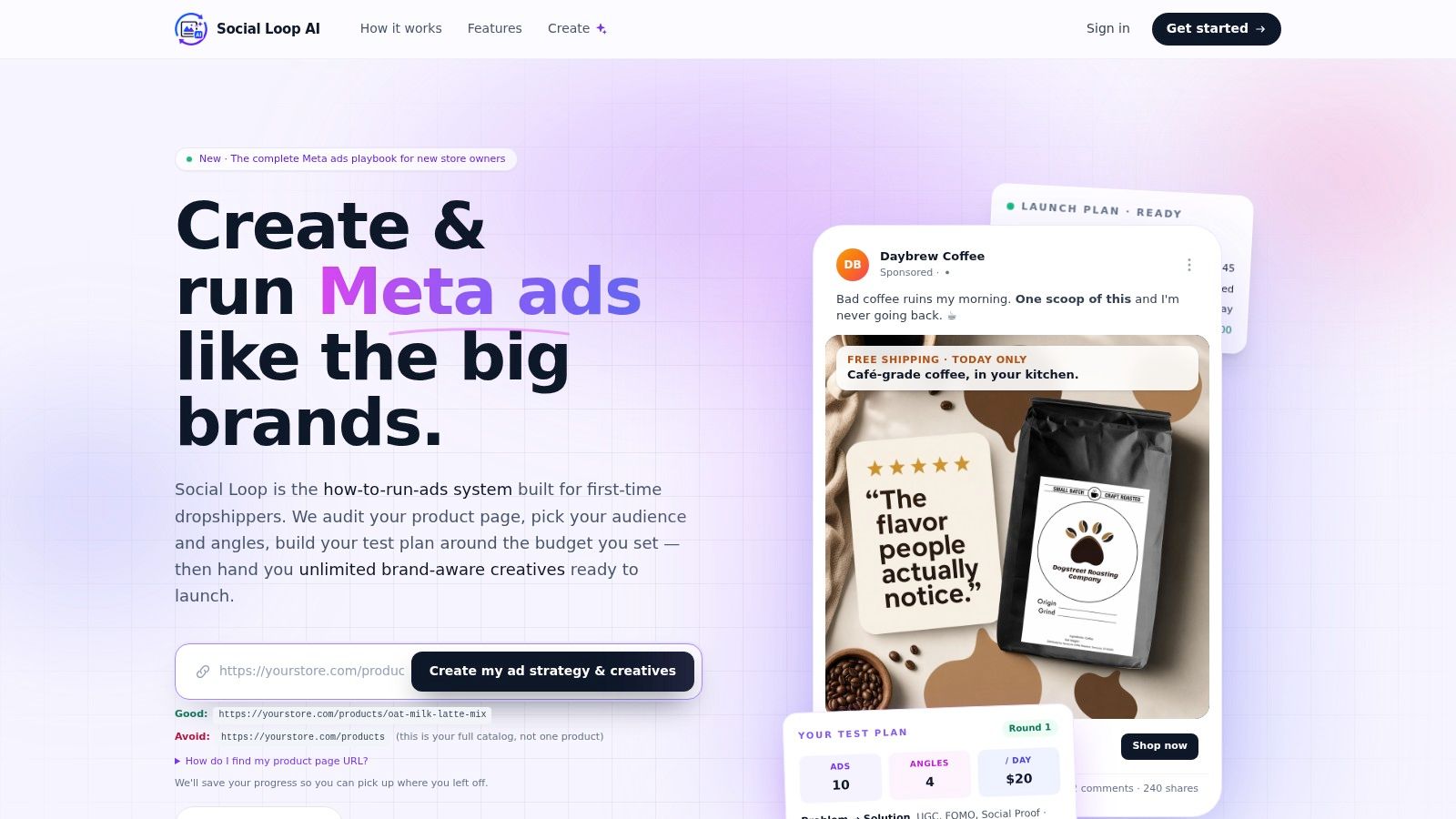
For a new store owner, the hard part usually isn't understanding the concept. It's turning a product page into a launchable creative set without hiring three separate people to do it. A guided system can reduce that gap by taking the product URL, scoring landing-page readiness, defining the buyer, and turning the budget into a round-by-round creative plan.
Social Loop AI is one example of that kind of workflow. It generates brand-aware ads from a product URL, including copy, hook, CTA, image, and layout, and its process is built to help beginners move from page audit to launch plan without stitching together a strategist, designer, and copywriter on their own.
The useful part is the structure. If you already know your angle and audience, a guided tool can keep the output aligned. If you're still learning, it can also show you what a launch-ready creative stack looks like before you spend on traffic.
Later, it can keep serving the same role for organic posts, which helps if you're trying to build a content system alongside your paid ads. That matters because most beginner stores need repeatable output, not just a one-time ad.
After this paragraph, the section includes a video walkthrough of the workflow in action.
Conclusion and Frequently Asked Questions
AI UGC ads can be a strong fit for ecommerce beginners because they lower production cost, speed up testing, and make it easier to learn what buyers respond to. They're not a universal replacement for human UGC, though. The smartest approach is to choose the format by job, test with a structured matrix, and run the compliance check before you launch.
Frequently Asked Questions
When should I avoid AI UGC ads?
Avoid them when the creative depends on deep trust, strong emotional nuance, or a real human story. Founder-led ads, testimonial-heavy campaigns, and some higher-sensitivity markets often need a real creator or founder on camera.
How do I tell creative fatigue from weak messaging?
Weak messaging usually looks bad from the start. Fatigue usually starts strong and then drops over time as the same audience sees it again. If the ad had early traction and then softened, you're probably looking at fatigue.
How many variations are enough?
A structured set of 10 to 20 variations can be useful when each version isolates a real variable. Random variations create noise. The question isn't only how many you made, it's whether the test setup can tell you something useful.
The best first move is not to make more ads at random. It's to make a few good ones with clear differences, launch them cleanly, and let the data tell you where to go next.
If you're ready to turn one product URL into a more disciplined ad launch process, visit Social Loop AI and see how its guided workflow maps product pages to angles, copy, and testing plans. It's built for first-time store owners who need a practical way to move from idea to launch without guessing.