Blog
What Is a UGC Creator: Essential Guide for Brands
Published July 15, 2026
A UGC creator is someone you pay to make authentic-looking photos, videos, or reviews for your brand to use in its own ads and social posts, and they don't need a big following to do the job. An influencer, by contrast, is paid to post to their own audience, so you're buying reach as much as content.
If you're a new dropshipper, this difference matters more than most guides admit. You're probably not struggling to find products to test. You're struggling to make ads that look believable, fit your budget, and give you enough creative variety to keep testing on Meta without burning cash on polished brand videos that feel like ads.
That's where UGC comes in. For a small store, the core value isn't celebrity, status, or borrowed attention. It's getting ad creatives that look like something a real customer would post, then using those assets inside your own campaigns where you control the spend, the targeting, and the testing.
Table of Contents
- Introduction Beyond Influencers Meet the UGC Creator
- UGC Creator vs Influencer The Critical Difference for Your Ad Budget
- Why UGC Is a Superpower for DTC Brands and Meta Ads
- How to Hire and Brief Your First UGC Creator
- The Anatomy of a High-Converting UGC Ad
- Conclusion Integrating UGC Into Your Marketing Flywheel
Introduction Beyond Influencers Meet the UGC Creator
You launch a Shopify store, upload your product, and start thinking about ads. Then you hit the wall. You need videos for Meta, maybe TikTok too, but you don't have customers sending in testimonials, and you probably don't want to pay an agency to shoot studio content for a product that hasn't proven itself yet.

A UGC creator solves that problem. They create branded content such as photos, short videos, and reviews for a brand to use in its own paid and organic channels, and they don't need a large audience to be useful. That's what separates them from influencers, who monetize access to their followers rather than producing the asset itself, as explained in this definition of a UGC creator.
What the brand is actually buying
When you hire a UGC creator, you're usually buying the content asset, not distribution. The brand can then repurpose that footage across Meta ads, TikTok, product pages, and social posts without depending on the creator's algorithmic reach.
That makes UGC especially practical for new ecommerce owners. You can test different hooks, objections, and product angles using content that feels like a customer recorded it at home instead of a marketing team producing a commercial.
Simple way to think about it: a UGC creator is closer to a freelance ad creative producer than a mini celebrity.
What UGC content usually looks like
Most beginners overcomplicate this. UGC usually looks familiar:
- Unboxings: Someone opens the package and reacts naturally.
- Product demos: A real person shows how the item works in normal life.
- Casual reviews: The creator talks about what they liked, what problem it solves, or why they'd buy it again.
- Testimonial-style clips: The video feels like a recommendation from a customer, not a company script.
If you've been asking “what is a UGC creator” because every article sounds vague, this is the plain answer. It's a person you hire to make trust-building ad content your store can use.
UGC Creator vs Influencer The Critical Difference for Your Ad Budget
Most new store owners mix these two roles together. That confusion gets expensive fast, because hiring the wrong type of creator changes what you're buying, how much control you have, and whether the content fits paid ads at all.
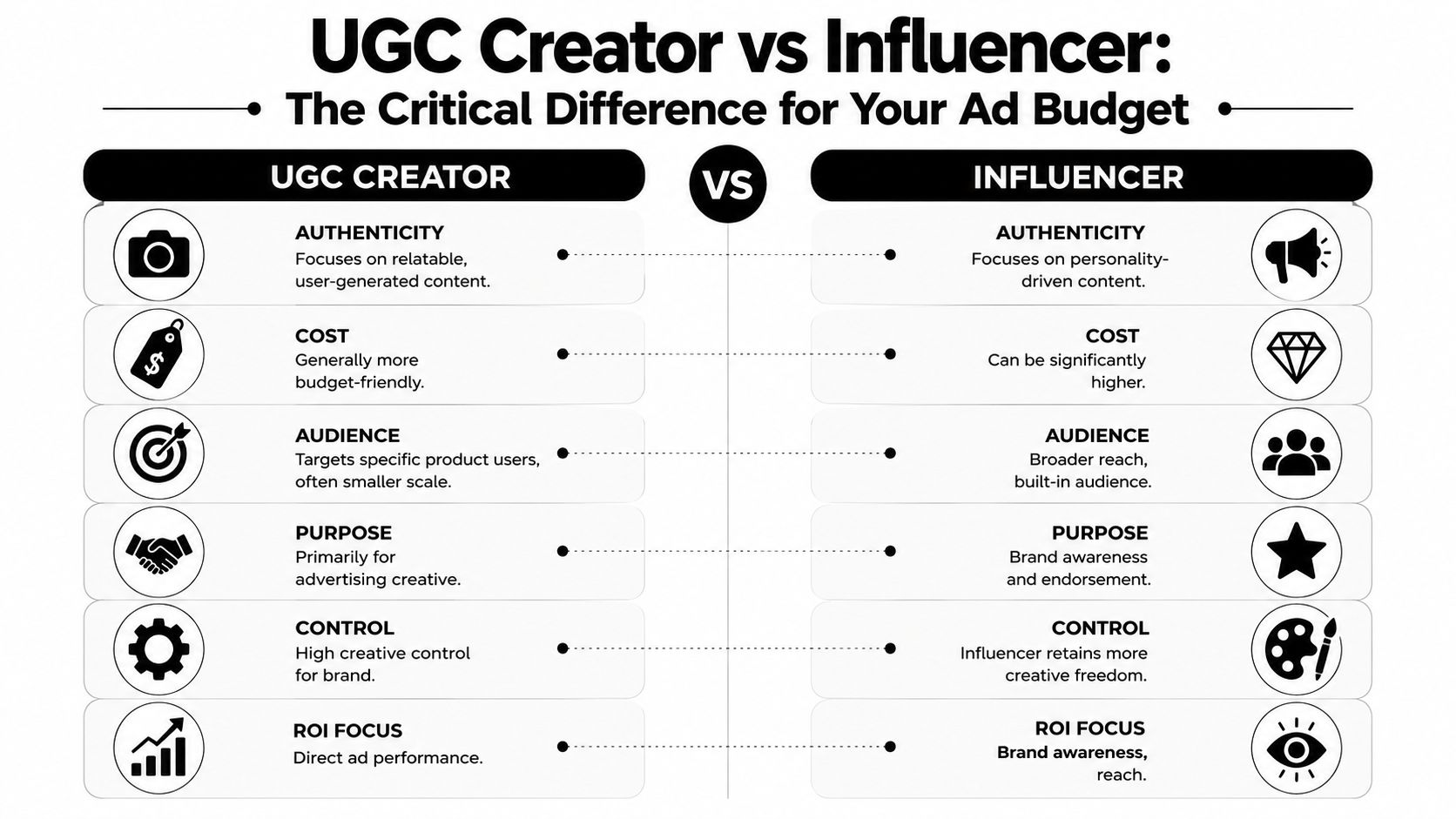
A useful data point makes the distinction hard to ignore. 87% of dropshippers incorrectly assume they need an influencer with followers to run UGC-style ads, yet paid UGC creators without followers drive 3.2x higher ad conversion rates in Meta campaigns because brands own the content rights and avoid influencer disclosure penalties, according to this 2026 UGC creator guide for dropshippers.
The easiest way to separate them
An influencer helps you borrow attention.
A UGC creator helps you build ad inventory.
That one distinction clears up most of the confusion. If your store is small and your goal is to test creatives inside Meta Ads Manager, a UGC creator usually fits the job better because you need usable footage, not a public endorsement.
Side by side comparison
| Attribute | UGC Creator | Influencer | Branded Content (Studio) |
|---|---|---|---|
| Primary value | Content asset for the brand to use | Access to the creator's audience | Polished brand-produced creative |
| Payment model | Paid for making the asset | Paid for posting and audience reach | Paid for production work |
| Need for large following | No | Yes, usually part of the value | No |
| Brand control | Higher control over messaging and usage | Less control because creator voice matters | Highest production control |
| Best use case | Paid social ads, landing pages, creative testing | Awareness campaigns, endorsements | Brand films, polished launches |
| Typical feel | Native, casual, customer-like | Personality-led, creator-led | Professional, commercial |
Why this matters when your budget is small
If you hire an influencer for a first campaign, you may end up paying for a post that disappears into their feed and doesn't give you enough reusable material for ad testing. If you hire a UGC creator, the brand can usually focus the spend on media buying, because the content is built for the brand's own channels.
Buy the asset when you need testing control. Buy the audience when you already know your message works and want distribution.
For dropshipping, that distinction is practical, not theoretical. Early-stage stores rarely lose because they lacked access to famous people. They lose because the ad creative didn't feel trustworthy, didn't explain the product clearly, or didn't give them enough variations to test.
The mistake beginners keep making
Many beginners hear “user-generated content” and assume it must come from real unpaid customers or large creators. That's not how paid UGC works. A professional UGC creator is hired to simulate the feeling of genuine customer content so your ads blend into the feed and feel believable.
If your goal is sales on a limited budget, this is the critical lens to use: ask whether you need a person's audience, or whether you need a batch of ad-ready assets your brand can legally use.
Why UGC Is a Superpower for DTC Brands and Meta Ads
Meta rewards content that fits the environment people are already scrolling through. That's one reason UGC works so well for direct-to-consumer brands. It looks closer to native social content than a polished studio ad, so it doesn't interrupt the feed in the same jarring way.
The format matters too. UGC output is typically short-form video in the 15 to 30 second range, built around things like unboxings, problem-solution stories, and casual reviews for TikTok, Instagram Reels, and Facebook, as described in this overview of UGC creator formats. The same source notes that non-polished, user-generated-looking content bypasses ad fatigue faster than studio assets and produces stronger click-through and conversion performance because it matches platform behavior more closely.
Why buyers respond to it
People on Meta don't open the app hoping to watch commercials. They scroll to see people, opinions, routines, reactions, and recommendations. UGC fits that pattern.
A good UGC ad often feels like:
- A friend showing a useful purchase
- A customer solving an annoying problem
- A quick review recorded right after delivery
- A simple demo that answers “does this work?”
That style builds trust faster than a glossy product montage for many products, especially impulse-buy items, problem-solving gadgets, beauty products, and simple home accessories.
When creative looks native to the feed, the product gets a fairer chance to earn attention.
Why it helps your ad account
UGC is also useful because it gives you more angles to test. One creator can film different hooks, objections, and use cases without the cost and logistics of a full production shoot. Brands often use these assets as a batch of scalable social proof creatives that can be tagged to specific angles such as FOMO or identity.
If you want inspiration for how those variations look in practice, review these UGC ad examples for ecommerce brands.
Why this matters more than aesthetics
Beginners often ask whether UGC is “better” than polished creative. That's the wrong question. A better question is whether the content fits the stage of the business and the way the platform works.
For a new store, UGC gives you three advantages at once:
- Speed: You can get usable ad creative without a large production setup.
- Believability: The video feels closer to a customer recommendation.
- Testability: You can swap hooks, scripts, and creator styles more easily.
That combination makes UGC powerful. It's not just cheaper-looking content. It's content designed to help a small brand test faster and look more credible while doing it.
How to Hire and Brief Your First UGC Creator
The hiring process feels intimidating until you reduce it to a few clear decisions. You need to know where to look, what quality to check for, what deliverables to request, and what rights you're paying for.
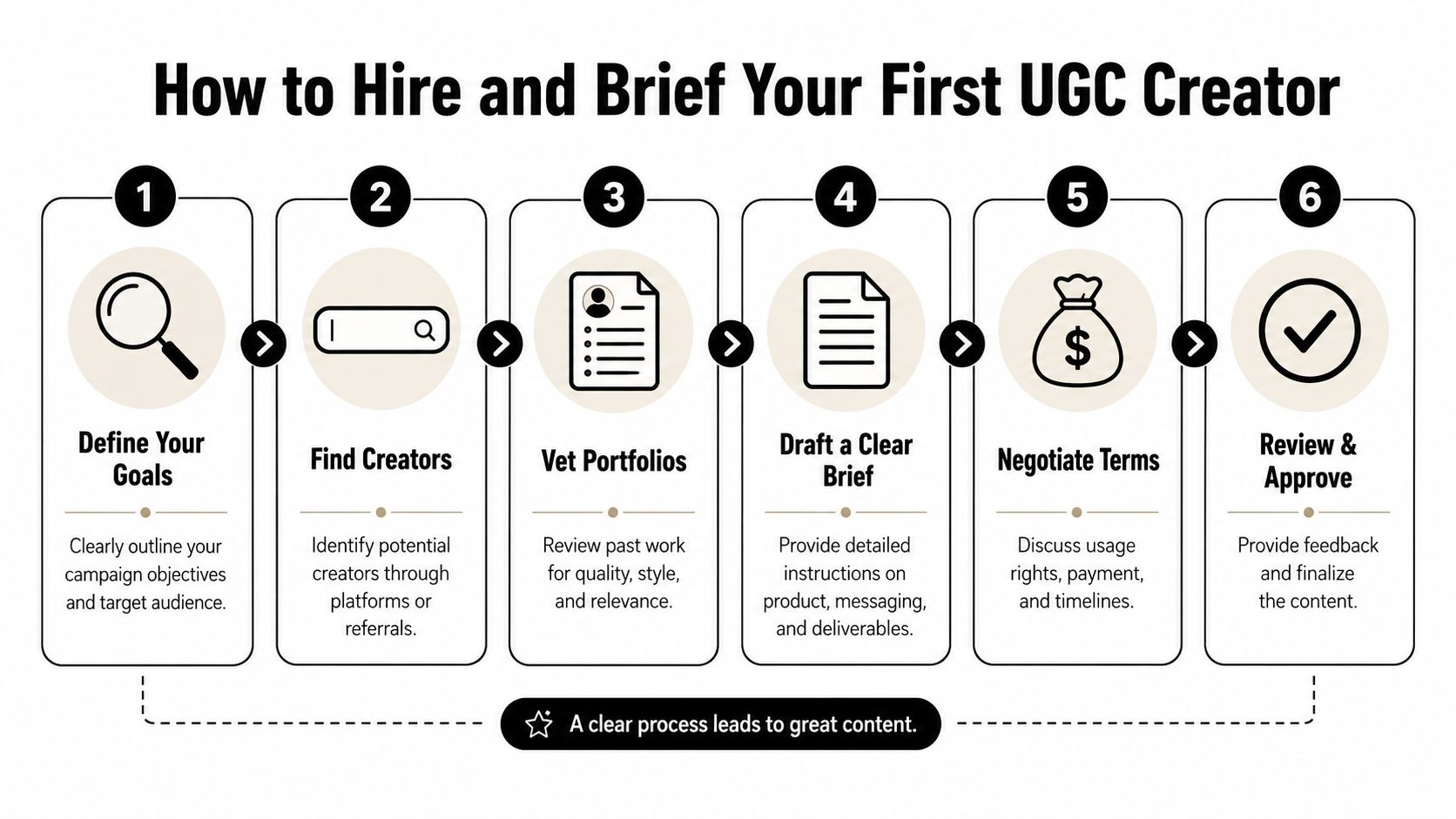
Platforms like Upwork and Fiverr are commonly used by creators and brands to connect, especially for beginners entering the market. Pricing also has useful benchmarks. According to this UGC pricing guide for creators and brands, beginners with 5 to 10 videos in their portfolio charge $75 to $200 per video, mid-level creators with 10 to 30 videos earn $250 to $500, and experienced creators command $500 to $1,000+. The same source notes that standard UGC video costs for ecommerce owners often range from $150 to $400 per 15-second asset, with typical paid ad usage rights lasting 6 to 12 months.
Step 1 Know what you want before you hire
Don't start by browsing creators. Start with the ad objective.
Write down:
- Your product's main job: What problem does it solve?
- Your buyer type: Who is most likely to care?
- The angle: Is this about convenience, social proof, identity, or a before-and-after feeling?
- The placement: Meta feed, Reels, Stories, or product page usage.
A vague request creates vague content. “Make me a video for my brand” is too broad. “Record a 15-second problem-solution video showing how this desk organizer reduces clutter for work-from-home buyers” is something a creator can execute.
Step 2 Vet the portfolio like a buyer, not like a filmmaker
You're not hiring for cinema. You're hiring for clarity, trust, and ad usability.
Look for these signals:
- Strong on-camera delivery: The person sounds natural, not stiff.
- Clear product framing: You can understand the product fast.
- Native style: The content feels like social media, not a commercial trying too hard to look casual.
- Variation: The creator can do unboxing, review, demo, and problem-solution formats.
Practical rule: If the portfolio looks beautiful but you can't imagine the clip in a Meta feed, keep looking.
Here's a useful walkthrough if you want to see the hiring process discussed visually before you send your first message.
Step 3 Send a brief that removes guesswork
A good brief saves money because it reduces revisions. Keep it short, but specific.
Use a structure like this:
- Product: Name the item and what it does
- Audience: Who the ad is for
- Problem: What frustration the buyer has
- Angle: Why this product is interesting
- Deliverables: Number of videos, length, and format
- Must-show moments: Packaging, demo, reaction, close-up, CTA
- Do not mention: Claims you can't support, awkward scripts, off-brand language
- Usage: Paid ads, organic posts, website, and rights period
- References: Two or three example ads you like
Step 4 Clarify rights before you pay
Many new founders often get sloppy by focusing on the video price while overlooking legal usage. If you plan to run the clip in paid ads, make sure that usage is explicitly covered.
Ask directly:
- Can I use this in Meta ads?
- How long do the paid usage rights last?
- Can I edit the footage into other variants?
- Can the creator post it too, or is it for brand use only?
The point of buying UGC is control. Don't assume you have rights just because you paid for the file.
Step 5 Start with a small test batch
For a first hire, don't order a huge volume. Ask for a small batch with different angles or hooks. This lets you learn who follows briefs well, who understands your product, and which style works with your traffic.
One creator might be great at testimonials but weak at demos. Another may have a stronger visual style but weaker delivery. Your first round should help you learn that quickly.
The Anatomy of a High-Converting UGC Ad
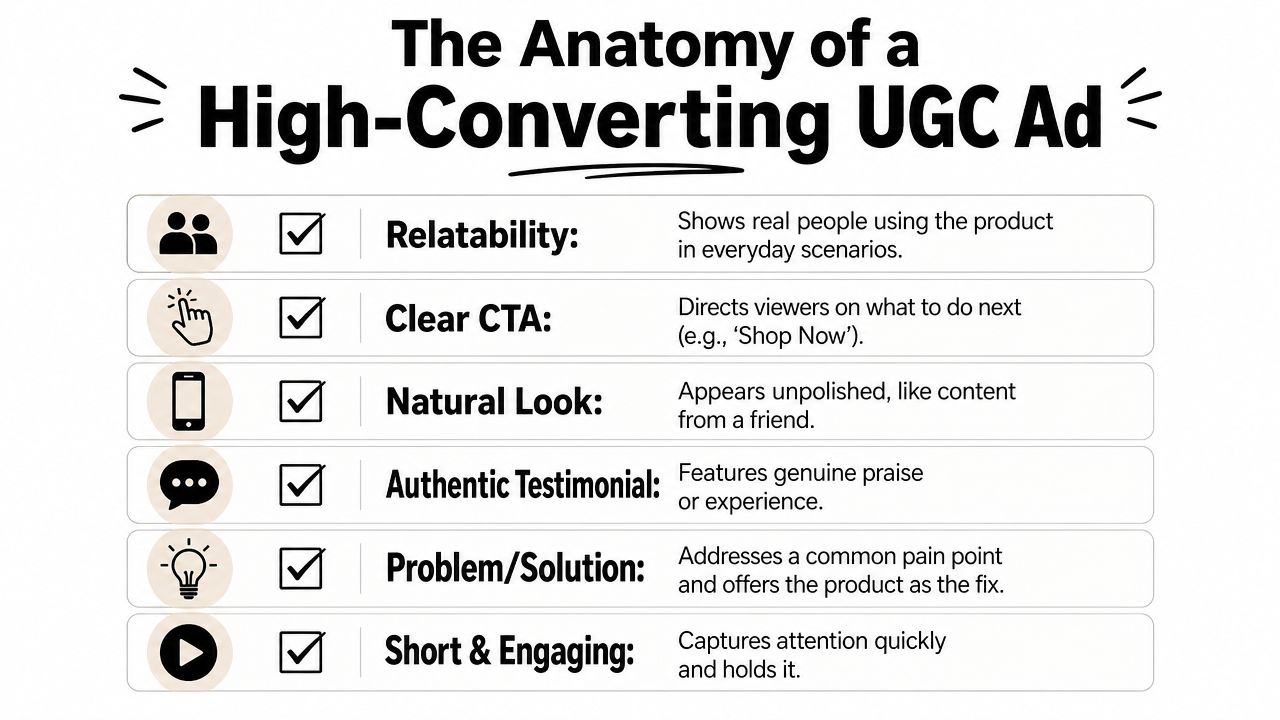
A good UGC ad doesn't win because it's random. It wins because it feels natural while still doing a sales job. That means the structure matters, even when the finished video looks casual.
What the viewer needs to understand fast
In most cases, the viewer needs four things quickly:
- The hook: Why should I stop scrolling?
- The problem: What frustration or desire is this about?
- The proof: Show the product in use, not just in theory.
- The action: What should I do next?
That's why common UGC formats work so well. An unboxing creates curiosity. A problem-solution script creates relevance. A casual review creates trust. Each format gives the buyer a reason to care without sounding like a classic ad.
A simple ad blueprint
You can judge most UGC ads with this checklist:
| Part | What it should do |
|---|---|
| Opening line or visual | Stop the scroll with a relatable moment or claim |
| Product reveal | Make the item obvious quickly |
| Demonstration | Show how it works in real use |
| Reaction or testimonial | Add believability and emotion |
| CTA | Tell the viewer what to do next |
A weak UGC ad usually fails in one of two places. It either takes too long to reveal the product, or it talks about benefits without showing them.
Formats worth requesting from creators
If you're briefing a creator, ask for formats, not just “a video.”
Try requests like:
- Unboxing clip: Best when packaging or first impression matters
- Problem-solution script: Best for pain-point products
- Casual review: Best when trust is the main barrier
- POV use case: Best when the buyer needs to picture themselves using it
If you want a deeper walkthrough on making these assets, this guide on how to make UGC that feels native and useful is a strong next read.
The standard beginners should aim for
Don't chase perfection. Chase clarity with authenticity.
If the creator looks too scripted, the ad can feel fake. If the clip is too messy, the product can feel confusing. High-converting UGC usually lives in the middle. It feels real, but it still guides the viewer through a clear sales story.
Conclusion Integrating UGC Into Your Marketing Flywheel
If you came here asking what is a UGC creator, the practical answer is simple. It's a creator you hire to produce customer-style content your brand can use in its own ads, without needing to pay for that person's audience.
That distinction is why UGC matters so much for first-time dropshippers. You're not just filling a content gap. You're creating a repeatable way to launch, test, and improve ad creative without depending on studio shoots or influencer deals that don't match your budget.
The long-term mindset that helps small brands
The smartest way to use UGC isn't as a one-off experiment. Treat it like a system.
Over time, you can build a library of:
- Different creators for different buyer types
- Different angles for different objections
- Different formats for different placements
- Different hooks for repeated testing
That's how a small store starts acting like a larger brand. Not by making one perfect ad, but by creating a steady loop of fresh, believable assets that can feed Meta, product pages, retargeting, and organic social.
UGC works best when you stop treating it like a trend and start treating it like your creative supply chain.
If you want to go deeper on building that system, this guide to a user-generated content strategy for growing brands is a useful next step.
The main thing to remember is this: a UGC creator is valuable because they help you buy usable trust in content form. For a new ecommerce brand, that's often the missing piece between “we launched ads” and “we launched ads that people believed.”
If you're trying to launch Meta ads without wasting weeks figuring out angles, hooks, and creatives from scratch, Social Loop AI helps you turn a product URL into a practical ad launch plan and a batch of brand-aware creatives built for first-time dropshippers. It's designed for small-budget ecommerce owners who need clearer testing plans, better creative direction, and a simpler path to getting campaigns live.